
No external tools needed: How to remove Gemini’s star watermark for free

Until now, Google added a star-shaped watermark to images, videos, and other media generated with Gemini to indicate that AI created the content.
If you wanted to remove the watermark, you had to use an external website or a tool such as Magic Eraser in Google Photos. Competing generative AI services such as ChatGPT do not add a visible watermark, which made Gemini’s watermark an inconvenience.
Google has added a setting that lets you prevent Gemini from adding a visible watermark to generated content. With this setting, Gemini will no longer place the star icon in the bottom-right corner of images and videos.
Table of Contents
How to turn off Gemini’s watermark
At the time of writing, Google does not let you change the watermark setting in the mobile app, so you need to configure it through the web version of Gemini. Once you change the setting on the web, Gemini applies it to images and videos you generate in the mobile app as well.
Open the web version of Gemini
Click the Settings button in the bottom-left corner
Change [Media watermark] to [Off]
![Screenshot of Gemini’s Settings drop-down menu with [Media watermark] set to [Off]](/_next/image/?url=%2Fapi%2Fmedia%2Ffile%2Fgemini-watermark-setting-english.png&w=1920&q=75)
Gemini will stop adding watermarks to generated images, videos, and music
Can people still tell that Gemini generated an image after you remove the watermark?
This setting removes the visible watermark only. It does not remove invisible provenance markers. Google Vice President Josh Woodward said, “while the visible watermarks are now optional, invisible SynthID watermarks and C2PA metadata are still being used for transparency.”
Major generative AI services, including ChatGPT and Grok, embed invisible provenance information through a system called C2PA. Gemini does the same. Even when you turn off the visible watermark, Gemini still embeds C2PA data and Google’s SynthID watermark.
You can check for these invisible markers with the Google Photos mobile app, the official C2PA verification tool, or Gemini.
When you open a photo or video with C2PA credentials in the Google Photos mobile app, the details section can show which generative AI tool created or edited the content under “How this was made.”
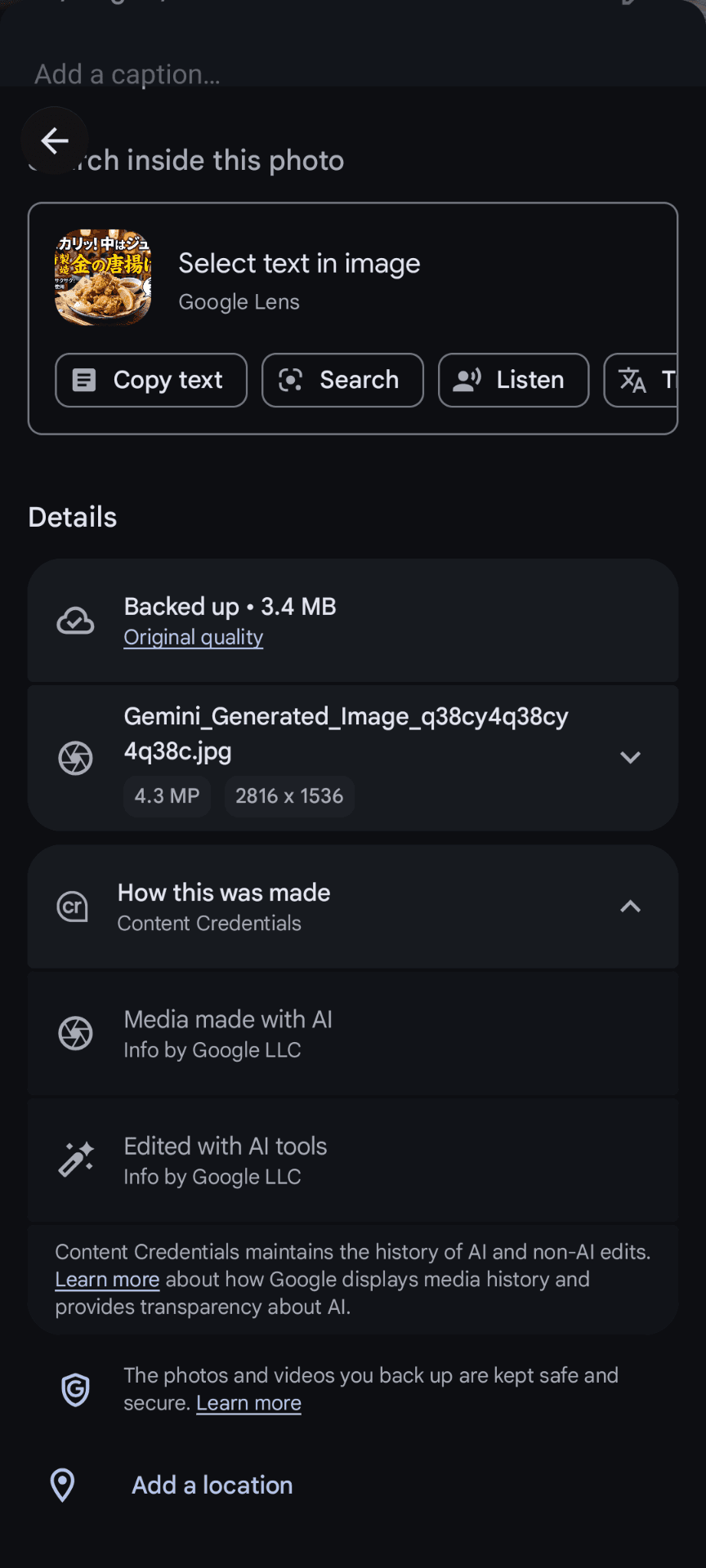
You can use the official C2PA verification tool to inspect C2PA credentials when the content contains them. If the content has no C2PA credentials, the tool displays an error that says [Something went wrong].
Gemini can detect invisible watermarks too. Attach the media you want to check and include the text “@SynthID,” and Gemini will tell you whether it detects a watermark.
My Analysis
Google had required visible watermarks on media generated with Gemini to discourage misuse. ChatGPT and Grok support C2PA embedding but do not add visible watermarks.
As a result, Gemini stood apart from other major generative AI services by adding a visible watermark, even though visible watermarks no longer served as a reliable way to identify AI-generated content.
Google’s new option makes Gemini-generated media easier to use while preserving provenance information through C2PA. The star icon in the bottom-right corner had become a recognizable sign of a Gemini-generated image, so removing it changes that association. Other major generative AI services did not use visible watermarks in the first place, though, so I do not expect the change to have much impact.
Verification details
Verification environment
- OS: Windows 11
- Browser: Zen Browser version 1.21.13b
Verification details
Confirmed that turning off Media watermark in the web version of Gemini prevents the star-shaped watermark from appearing in the bottom-right corner of media generated with Gemini on the web or in the mobile app
Last verification date
Share this article
Follow us for updates
Adding us to your preferred sources on Google makes it easier to find our articles on Google. Also, be sure to follow us on X and our RSS feed.


-1.png&w=1080&q=75)
I've been using JavaScript more than my native language since birth. I am nowhere and everywhere on the internet.
I build web apps and browser extensions in TypeScript as a web frontend programmer. I released Shadowban Scanner, a tool that detects shadowbans on X, and Restore Link Card, a tool that brings back link cards. Media outlets in Japan and abroad covered both tools. For iGEM 2023, I built the Wiki for Team Japan-United and helped the team win the Grand Prize. On my blog, I cover news about X and social media, test and troubleshoot bugs, and share frontend development insights.
![Screenshot of a Chrome window with an [Ask Gemini] button and a context menu below it showing an [Unpin] option](/_next/image/?url=%2Fapi%2Fmedia%2Ffile%2Fchrome-gemini-unpin-english.png&w=1080&q=75)






![[新しいXチャットへようこそ]というテキストが画面に大きく表示されており、その下には次の3つの説明が表示されている。[エンドツーエンドの暗号化:メッセージは、端末にかかわらずエンドツーエンドで暗号化されています。][最先端のプライバシー:Xを含め、他の人がメッセージを読むことはできません。][パスコードを設定:メッセージを保護するため、4桁のパスコードを設定してください。]これらの説明の下には、[パスコードを作成]という大きなボタンが配置されている](/_next/image/?url=%2Fapi%2Fmedia%2Ffile%2Fwelcome-to-new-chat.png&w=1920&q=75)


