
Is HEISEI-VHS dangerous? Is it used to train generative AI? I investigated!

Edited with HEISEI-VHS
On X, "HEISEI-VHS," which lets you process images to look like VHS footage from the early Heisei era, has recently been going viral.
平成初期のビデオ映像を黎明期のネットにアップして劣化した画像を再現する「HEISEI-VHS」を正式にリリースしました。
— ひやめし (@Hiyameshi_8bit) March 14, 2026
以前のβ版より使いやすくなってます。
簡単に共有できるので是非。#HEISEI_VHShttps://t.co/ouaO0tChOb pic.twitter.com/CZRzXTdeIG
However, some users have raised concerns such as whether processing images with HEISEI-VHS results in image data being collected, whether generative AI is used to process the images, and whether images processed with HEISEI-VHS are used to train generative AI.
In this article, I, as someone who specializes in web front-end development, examined these concerns surrounding HEISEI-VHS.
Table of Contents
First, check the privacy policy
First, I checked HEISEI-VHS's privacy policy.
Clicking the information button in the lower left displays the privacy policy and terms of use, and the privacy policy states the following.
Privacy Policy
This application executes all image processing locally in your browser via WebAssembly. Your image data is never sent to or stored on any external servers.
In other words, if what is written in the privacy policy is true, the image processing runs on the PC, so the images are not sent to a server.
Next, I will verify whether this claim is true.
Are images uploaded to a server? Are they used to train generative AI?
I will examine whether images dragged and dropped into HEISEI-VHS are uploaded to a server.
If the images are not uploaded to a server, then the image data is not being collected, and if it is not being collected, then it would not be used to train generative AI either.
Check the network traffic
Here is the result of loading HEISEI-VHS with the browser's developer tools open so that the network traffic could be inspected, and then dragging and dropping an arbitrary image into it.
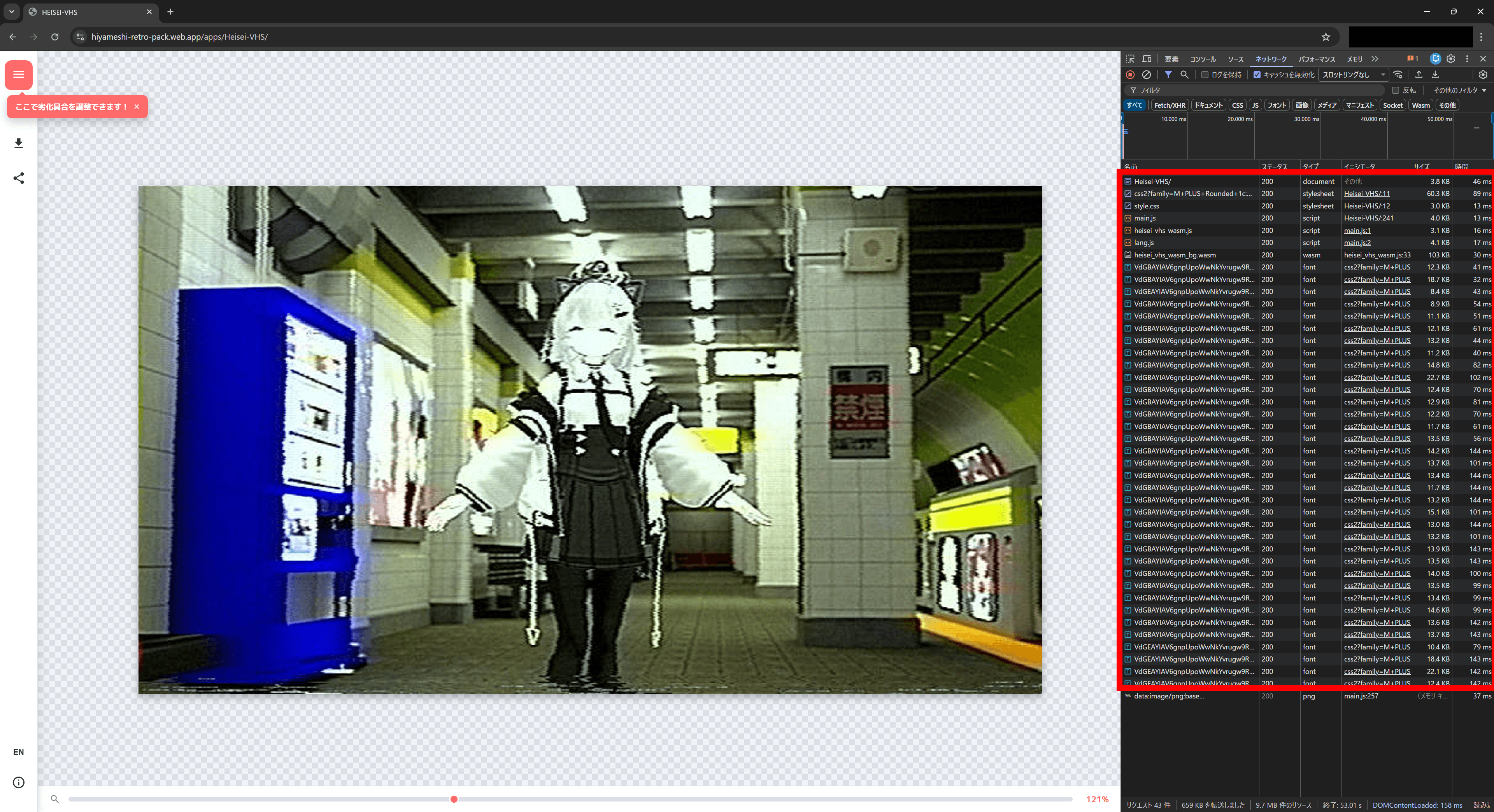
The parts surrounded by the red outline are what are loaded when the page is first opened, including HTML, CSS, JavaScript, Wasm, and fonts.
HTML defines the structure of a web page, and CSS defines the appearance of the web page created with HTML.
JavaScript and Wasm handle things like what happens when buttons are clicked and the image-processing operations.
There is only one network entry shown after the image is dragged and dropped, and that is the processed image data.
Although the processed image data appears in the network log, what it actually is is something called a data URL.
A data URL contains the data embedded in the URL itself, so it is not actually retrieving data from any server.
At least within the range visible in the browser developer tools' Network tab, the images were not being sent to a server, and no suspicious communication was observed.
Check the source code
As mentioned above, at least within the range visible in the browser developer tools, no suspicious behavior was observed.
However, there are some methods for communicating in ways that do not appear in the developer tools, and the following article explains some of them.
To fully confirm that the tool is safe, it is necessary to use external tools that can inspect network traffic in more detail or to inspect the source code (the program for the web page).
When I inspected HEISEI-VHS's HTML, I found that it loads a JavaScript file called main.js, and main.js internally loads the JavaScript files heisei_vhs_wasm.js and lang.js.
After reading and checking them myself, I found that the contents of each file were as follows.
main.js: Handles UI-related processing and also includes logic for loading and controllingheisei_vhs_wasm.jsandlang.jsheisei_vhs_wasm.js: Loads the Wasm that processes the images and acts as a bridge between Wasm and JavaScriptlang.js: Contains the Japanese UI text data and the English translation data
I carefully reviewed the processing in each file, and there was no code that sends image data to a server.
Naturally, there was also no code that would use dragged-and-dropped images for training generative AI.
To begin with, it is impossible to run generative AI training on an ordinary user's PC in a short amount of time, so unless the images are uploaded to a server, training generative AI is not realistic. Even if training could somehow be run on the PC, it would be meaningless unless the results could then be uploaded to a server.
Is generative AI used for the image processing?
The image-processing logic runs in Wasm, but Wasm is not designed to be human-readable, and decoding HEISEI-VHS's Wasm produces more than 100,000 lines.
Inspecting the contents of the Wasm processing is not realistic, so I cannot definitively state whether generative AI is being used.
However, based on the constraints and the observed behavior, it is highly likely that it does not use generative AI.
First, the kind of image processing HEISEI-VHS performs can be sufficiently achieved with classical image-processing techniques that do not use generative AI, so using generative AI for this would not make sense in terms of development or execution cost.
Running generative AI requires enormous computation, so if a free service run by an individual used generative AI on the server side (although HEISEI-VHS does not send images to the server in the first place), the developer would go bankrupt, and if it ran on the user's PC, it would become a very heavy service.
HEISEI-VHS works lightly even on smartphones, and changes to the filter settings are reflected immediately, which strongly suggests classical image processing.
Second, HEISEI-VHS allows users to toggle some filters on and off and adjust things like filter strength.
Making such fine-grained filter adjustments with generative AI would be difficult, whereas it is easy with classical image processing.
Third, neither the network traffic nor the JavaScript in HEISEI-VHS contains anything that appears to download a generative AI model.
General generative AI systems typically require downloading and running models ranging from several GB to, in some cases, dozens or even hundreds of GB, but HEISEI-VHS has no such processing, and the page also finishes loading instantly.
Although I cannot definitively state that HEISEI-VHS absolutely does not use generative AI, for these reasons I believe it is almost certain that it is not using generative AI for image processing.
Verification results
To summarize the results of the verification:
- Is image data being collected? -> HEISEI-VHS does not upload images to a server, and processing is completed locally
- Is it used to train generative AI? -> Since the image data is not being collected, it is also not used to train generative AI
- Is generative AI used to process the images? -> It is highly likely that it is not
From these perspectives alone, HEISEI-VHS is a tool that safely completes processing locally.
That said, being cautious about websites or software that ask you to drag and drop images or files, or enter personal information, is very important.
Within the scope I checked at the time of writing, HEISEI-VHS was a tool that could be used with peace of mind, but there are tools on the internet that are not.
It remains important to be careful before using websites and tools.
Conclusion
I examined concerns such as whether HEISEI-VHS, which can process images with a VHS-style filter, collects image data, whether it uses generative AI for image processing, and whether images processed with HEISEI-VHS are used to train generative AI.
HEISEI-VHS does not upload image data to a server, and it is also not used to train generative AI.
It is highly likely that the image processing uses classical image-processing techniques rather than generative AI.
However, there is nothing wrong with being cautious about websites and tools on the internet; in fact, it is important.
Share this article
Follow us for updates
Adding us to your preferred sources on Google makes it easier to find our articles on Google. Also, be sure to follow us on X and our RSS feed.


-1.png&w=1080&q=75)
I've been using JavaScript more than my native language since birth. I am nowhere and everywhere on the internet.
I build web apps and browser extensions in TypeScript as a web frontend programmer. I released Shadowban Scanner, a tool that detects shadowbans on X, and Restore Link Card, a tool that brings back link cards. Media outlets in Japan and abroad covered both tools. For iGEM 2023, I built the Wiki for Team Japan-United and helped the team win the Grand Prize. On my blog, I cover news about X and social media, test and troubleshoot bugs, and share frontend development insights.





![Screenshot of Discord's settings page, with the [Show my message content from discoverable channels on web pages] option highlighted by a red border in the [Data & Privacy] section.](/_next/image/?url=%2Fapi%2Fmedia%2Ffile%2Fdiscord-message-visibility-setting-english.png&w=3840&q=75)




![Xのポストの投稿画面に[Made with AI]というラベルが表示されているスクリーンショット](/_next/image/?url=%2Fapi%2Fmedia%2Ffile%2Fx-made-with-ai-label.png&w=1920&q=75)

