Explaining the meaning and differences between X (Twitter) user name, account name, and user ID

On X (Twitter), there are several very similar terms: "user name", "account name", and "user ID", but all of them have different meanings.
In this article, I will explain in detail the meanings and differences between user names, account names, and user IDs on X.
Table of Contents
Meaning of user name (screen name)
An X user name is a string that starts with @ to identify an account, and it is also used in the account's URL.
Within X, user names are also called screen names or handles.
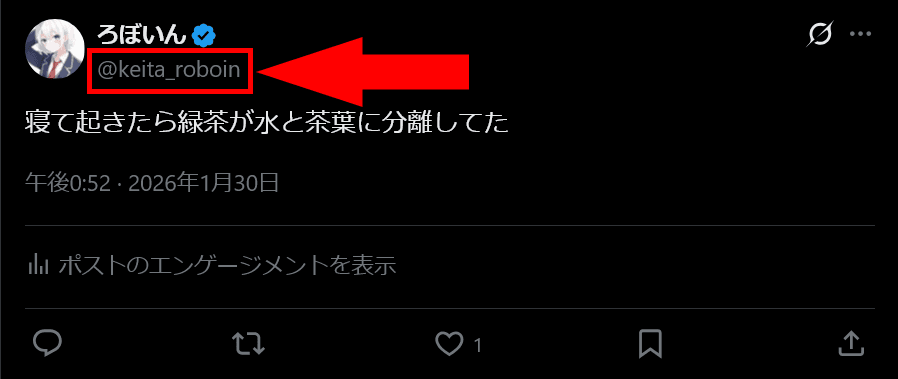
Only alphanumerics and underscores can be used in user names.
You cannot set the same user name as another user, but if you change your user name, your old user name becomes available for other users to use.
In other words, as long as you do not change your user name yourself, you can reach your X account using only the user name, but if you change your user name, not only will you no longer be able to reach your account, you may also end up reaching a different account.
Meaning of account name (display name)
Among the names shown on posts and on an account's profile, the one that is not the user name is called the account name.
Account names are also called display names.
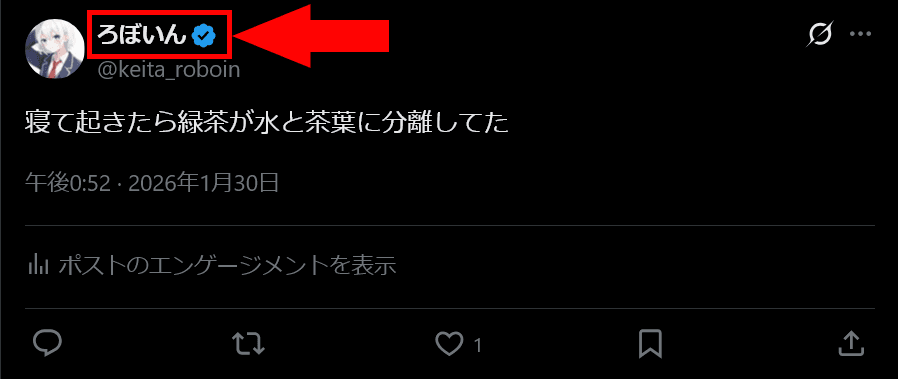
There are no restrictions on the characters you can use in an account name.
Unlike a user name, you can set the same account name as other users, and even if you change your account name, the account's URL does not change.
User ID
In general, "user ID" is often used to mean the same thing as a user name, but strictly speaking, it has a different meaning.
A user ID is an ID consisting only of numbers that is automatically assigned to each account.
Because it is used internally by X's system, you basically will not see it when using X.
A user ID will never duplicate another account's, and once you create an account, you cannot change it.
You can find the user ID by looking at the part of the profile banner image URL (not the icon image) from https://pbs.twimg.com/profile_banners/ up to the next slash.
For example, the current banner image for my account is https://pbs.twimg.com/profile_banners/1188829372918026241/1753686347, so the user ID is 1188829372918026241.
Differences between user name, account name, and user ID
|
User name (screen name) |
Account name (display name) |
User ID | |
|---|---|---|---|
|
What does it refer to? |
A string starting with |
The name shown on profiles and posts (the one that is not @) |
A numbers-only ID automatically assigned when the account is created |
|
Where it is shown |
Shown "with @" on profiles, posts, mentions, search, etc. |
At the top of posts, on profiles, etc. |
Basically not visible in normal use (for internal use) |
|
Format / usable characters |
Alphanumerics + underscore only |
No character restrictions |
Numbers only |
|
Can it duplicate? |
No (unique) |
Yes |
No (unique) |
|
Can it be changed? |
Yes |
Yes |
No |
|
Relationship with URLs |
Used in the profile URL (e.g., |
The URL does not change |
Can be checked from |
|
Notes / additional info |
If you change it, your old user name becomes available for others to use, and the old user name may show a different account |
Many people can have the same name |
Often confused with a user name, but it is different. The ID is an immutable number |
Conclusion
This article explained in detail the differences between X user names, account names, and user IDs.
A user name is a string that starts with @ to identify an account, and it is also called a screen name.
An account name is the name shown on profiles and posts, the one that is not @.
A user ID is often confused with a user name, but strictly speaking, it is an unchangeable ID used internally by X.
Share this article
Follow us for updates
Adding us to your preferred sources on Google makes it easier to find our articles on Google. Also, be sure to follow us on X and our RSS feed.


-1.png&w=1080&q=75)
I've been using JavaScript more than my native language since birth. I am nowhere and everywhere on the internet.
I build web apps and browser extensions in TypeScript as a web frontend programmer. I released Shadowban Scanner, a tool that detects shadowbans on X, and Restore Link Card, a tool that brings back link cards. Media outlets in Japan and abroad covered both tools. For iGEM 2023, I built the Wiki for Team Japan-United and helped the team win the Grand Prize. On my blog, I cover news about X and social media, test and troubleshoot bugs, and share frontend development insights.
![ブロックユーザー確認ツール あなたをブロックしているユーザーを特定できます。あなたは何人ものユーザーに持続的な影響力や反響を与えているのか調べてみましょう。※本ツールはX(旧Twitter)社の**公式API**を利用して情報を取得します。 [Xにログインして確認を開始]](/_next/image/?url=%2Fapi%2Fmedia%2Ffile%2Fx-block-checker-phishing-campaign.png&w=3840&q=75)