Don’t use X block checker. They can get your account hacked
![ブロックユーザー確認ツール あなたをブロックしているユーザーを特定できます。あなたは何人ものユーザーに持続的な影響力や反響を与えているのか調べてみましょう。※本ツールはX(旧Twitter)社の**公式API**を利用して情報を取得します。 [Xにログインして確認を開始]](/_next/image/?url=%2Fapi%2Fmedia%2Ffile%2Fx-block-checker-phishing-campaign.png&w=3840&q=75)
More websites now claim that they can show “who has blocked you” or “how many people have blocked you” on X.
When you log in to your X account on these websites, attackers may hijack your account. Do not use block checker sites.
Table of Contents
Don’t log in to X block checker sites
You may find websites that claim to offer X block checker tools through posts on X or Google Search.
When you open one of these websites, you may see a login screen. Do not enter your email address, password, or other information.
Watch out for websites that make claims like these:
- They claim they can show which users have blocked you.
- When you open the website, it shows a login screen that asks for your X account email address, password, or other information.
- They claim they can show how many people have blocked you or a list of accounts that have blocked you for free.
- They say you may receive a login notification from X, but that there is no problem.
Many login screens that appear on these websites are fake. If you enter your email address, password, or other information, attackers will use it to hijack your account.
Even when a mutual follower shares a block checker tool, you need to stay careful. An attacker may have hijacked that person’s account and posted the recommendation from it.
In a fake block checker tool I investigated in the past, the site sent the entered information to the attacker’s Discord.
I published a detailed analysis in this article.
Why tools that check who blocked you on X are dangerous
Some websites once let users check information such as how many people had blocked them on X.
X then started charging for the API that outside websites need to connect with X. As a result, most free block checker sites that people used at scale shut down.
Most block checker sites that still exist now fall into one of two groups: paid tools for companies and influencers, or dangerous websites that claim to be free while stealing login information and hijacking accounts.
When X started charging for API access, free block checker tools that could not make money could no longer continue operating.
To keep running, operators now have to use unofficial methods such as asking users to enter login information, or they have to charge users.
A legitimate developer would not ask users for login information through an unofficial method that creates security risks.
As a result, most block checker tools that remain today are either paid tools or tools built to hijack accounts.
Websites built to hijack accounts ask users to enter their X login information. After users enter it, the sites may show the number of people who have blocked them.
But the operators have little reason to count the number of people who blocked you with care, so they likely show a random number.
In any case, stay cautious around websites that claim to offer X block checker tools.
What to do if you opened a block checker site
If you only opened a block checker site, you have little risk of getting your account hijacked.
If you did not enter anything, close the page.
If you entered information on the login screen that appeared after opening a block checker site, take action right away, such as changing your password.
- Change the password for the account whose password you entered.
- Check for suspicious login history.
- Enable two-factor authentication if you have not set it up yet.
On X, you can change your password from [Settings and privacy] > [Account] > [Change your password].
You can check your login history from [Settings and privacy] > [Security and account access] > [Apps and sessions] > [Account access history].
You should also enable two-factor authentication if you have not set it up yet. Two-factor authentication requires you to enter extra information in addition to your password before you can log in, so it can protect your account even if your password leaks.
You need a dedicated app, but you can enable two-factor authentication from [Settings and privacy] > [Security and account access] > [Security] > [Two-factor authentication].
If you can no longer log in, go to the X Help Center and start the account recovery process.
If you use the same email address and password for accounts outside X, you should change those passwords as a precaution.
Be careful with account connections too
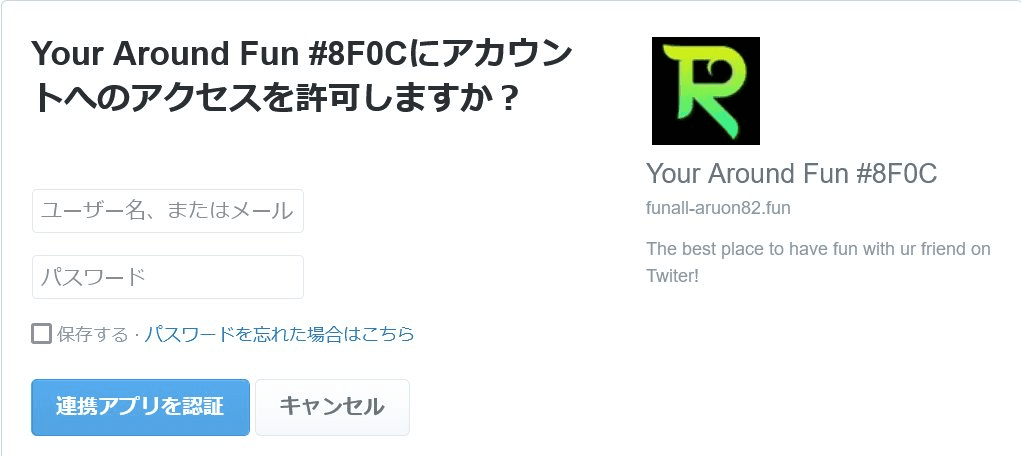
Even if a website does not ask for your password or other information, you need to be careful with websites that ask you to connect your X account.
If you authorize account access for a malicious website, it may post without your permission, follow unfamiliar accounts, or send DMs.
They are not block checker tools, but sites often seen on X, such as “My Twitter Interaction Circle,” “My Twitter Family,” and “Twitter Family Tree,” are spam sites that may fund criminal organizations. If you connect your account, the operators can make you follow unfamiliar accounts without your permission.
Conclusion
More websites now claim that they can show “who has blocked you” or “how many people have blocked you” on X.
When you log in to your X account on these websites, attackers may hijack your account.
Even when a site does not ask you to log in, use great caution with account connections.
Verification details
Verification details
I searched for block checker sites on Google and X, then verified through my own testing that they were phishing sites.
Last verification date
Share this article
Follow us for updates
Adding us to your preferred sources on Google makes it easier to find our articles on Google. Also, be sure to follow us on X and our RSS feed.


Next articles
- What does “This conversation is now end-to-end encrypted” mean in X Chat (DMs)? Explanation
- X (Twitter) DMs integrated into XChat: What’s the difference between DMs and XChat?
- What is the X (Twitter) Chat passcode? What happens if you forget it?
- X sues users accused of exploiting creator revenue sharing to fraudulently obtain about $277,000
- Can’t host an X Space on Android? Why the option disappeared and how to work around it
-1.png&w=1080&q=75)
I've been using JavaScript more than my native language since birth. I am nowhere and everywhere on the internet.
I build web apps and browser extensions in TypeScript as a web frontend programmer. I released Shadowban Scanner, a tool that detects shadowbans on X, and Restore Link Card, a tool that brings back link cards. Media outlets in Japan and abroad covered both tools. For iGEM 2023, I built the Wiki for Team Japan-United and helped the team win the Grand Prize. On my blog, I cover news about X and social media, test and troubleshoot bugs, and share frontend development insights.


![Xのポストの投稿画面に[Paid partnership]というラベルが表示されているスクリーンショット](/_next/image/?url=%2Fapi%2Fmedia%2Ffile%2Fx-paid-partnership-label.png&w=1920&q=75)


![Screenshot of Discord's settings page, with the [Show my message content from discoverable channels on web pages] option highlighted by a red border in the [Data & Privacy] section.](/_next/image/?url=%2Fapi%2Fmedia%2Ffile%2Fdiscord-message-visibility-setting-english.png&w=3840&q=75)