Make YouTube's entire background glow with videos using Ambient Light for YouTube

Video: © copyright 2008, Blender Foundation / www.bigbuckbunny.org
YouTube has a feature called “ambient mode” that changes the UI background colors based on the video you’re watching to create a more immersive experience.
I’ll introduce Ambient Light for YouTube, a browser extension that takes the concept further and lets you illuminate the entire YouTube page. You can control how far the light spreads, and music videos can look striking with the spread set to its maximum value.
Table of Contents
What is Ambient Light for YouTube?
When Google redesigned YouTube in 2022, it introduced “ambient mode,” which changes the screen’s background color based on the video.
Google describes ambient mode as subtly shifting the background to pale colors, and the effect stays restrained. I use YouTube with ambient mode enabled in daily use. It adds some immersion, but I find its effect limited.
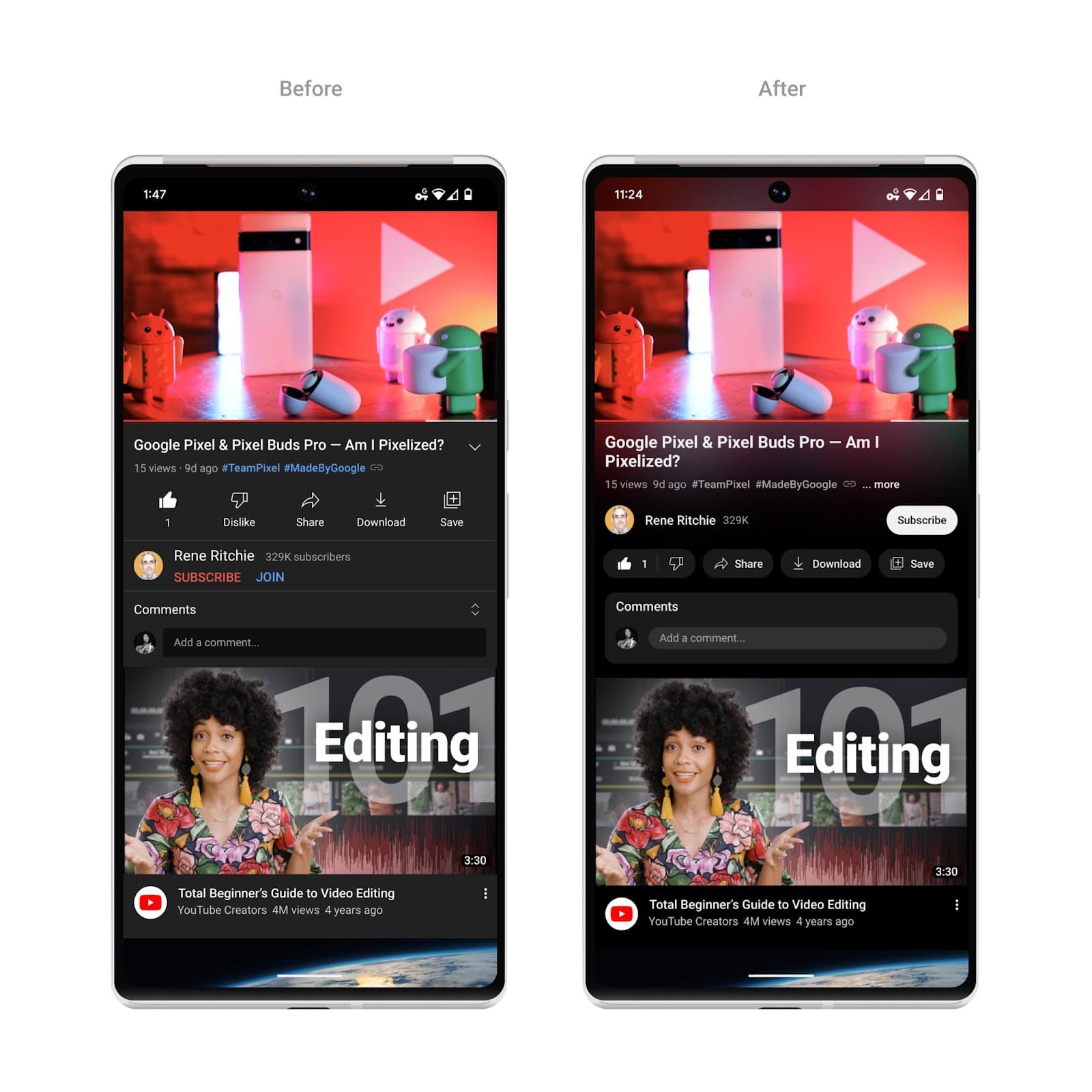
Image: Google
Over the past few days, a free browser extension called Ambient Light for YouTube has attracted attention on X.
I installed Ambient Light for YouTube and played a video on YouTube. You can see the result below.
YouTube’s standard ambient mode creates a faint glow around the video. With Ambient Light for YouTube installed, the glow can fill the entire screen and respond much more strongly to the video. The video above has relatively calm motion, but music videos with rapid movement or flashing visuals can produce a striking effect.
According to the GitHub commit history, development of Ambient Light for YouTube began in 2017, before YouTube introduced ambient mode. Google may have taken inspiration from the extension when developing its own feature.
How to install and use Ambient Light for YouTube
Ambient Light for YouTube supports Google Chrome, Microsoft Edge, Mozilla Firefox, and Opera. I tested it with Zen Browser, which uses Firefox as its base. Other Firefox-based browsers and Chromium-based browsers such as Brave should also work.
Install the version of Ambient Light for YouTube that matches your browser.
After installation, YouTube adds a settings button with a blue “AL” badge to the playback controls. Click this button to adjust the extension’s settings.
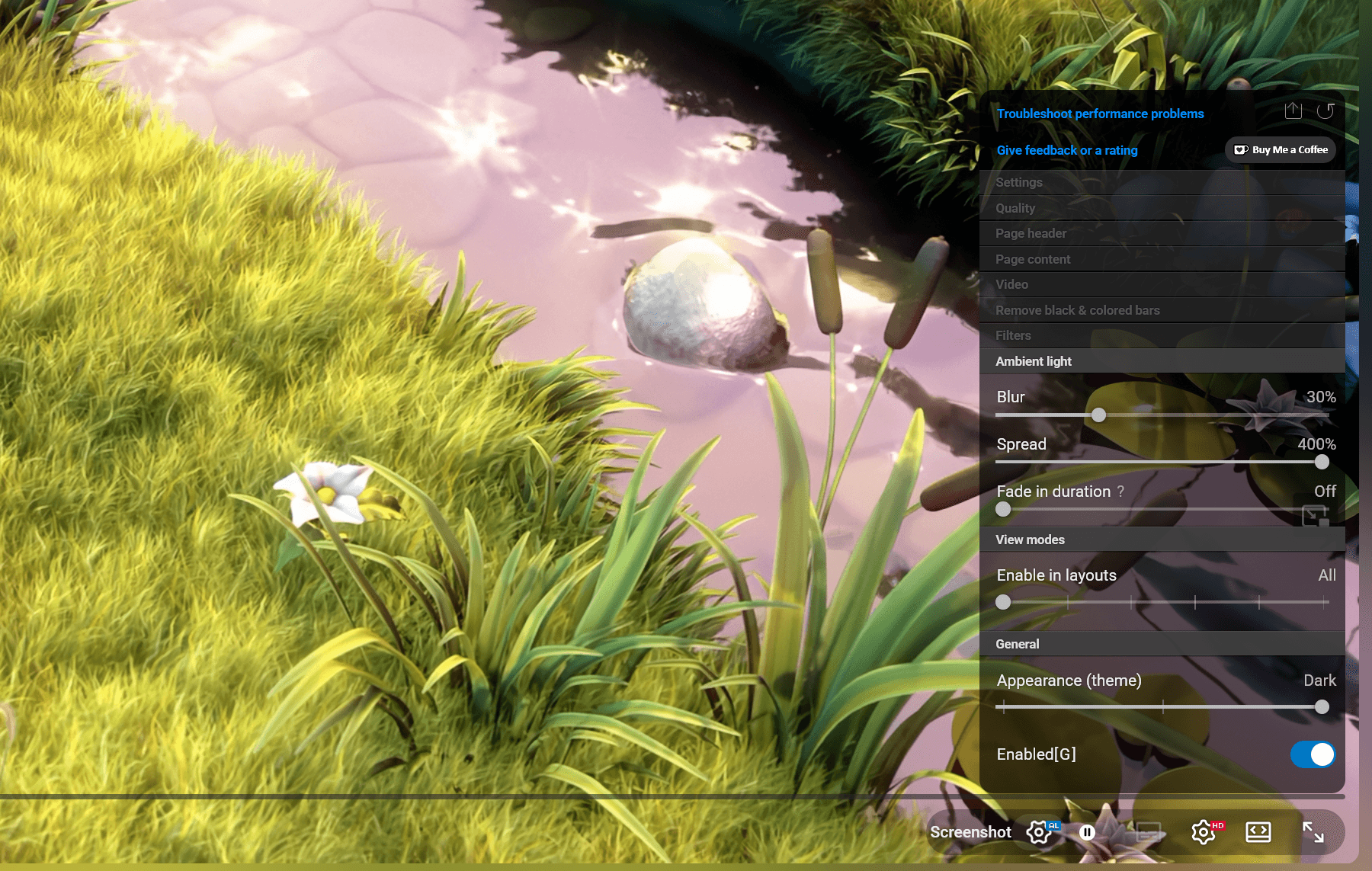
With the default settings, the effect does not look much different from YouTube’s standard ambient effect. Increasing the [Spread] value makes the glow extend across the entire screen. For the video shown above, I set [Spread] to its maximum value of 400% and left the other settings at their defaults.
Ambient Light for YouTube also includes settings such as [Blur], [Fade in duration], [Enable in layouts], and [Appearance (theme)]. Try different values to find an appearance you like.
Can you use it in the YouTube mobile app?
Ambient Light for YouTube is a browser extension, so you cannot use it in the YouTube app on a smartphone.
Some Android browsers, including Firefox and Edge, support browser extensions. However, I could not install Ambient Light for YouTube with Firefox for Android. Microsoft Edge for Android let me install the extension, but its settings button did not appear and I could not see its lighting effect. I confirmed that it works if you switch YouTube to its desktop site in Edge for Android, although the desktop version of YouTube does not work well for smartphone controls.
Is it free?
Ambient Light for YouTube is an open-source browser extension with publicly available source code, and you can use all of its features for free.
The GitHub repository includes a Ko-fi donation link, so you can support the developer if you like the extension.
How demanding is it?
According to the README in the GitHub repository, the developer recommends a GPU that scores at least 1,000 points in the PassMark Video Card Benchmark.
My PC has an NVIDIA GeForce RTX 3070 Ti with a PassMark Video Card Benchmark score of 23,166, and I encountered no performance problems. I also noticed no significant load when I opened the desktop version of YouTube in Microsoft Edge on a Google Pixel 8, so most mainstream PCs should handle the extension without trouble.
Verification details and sources
Verification environment
- OS: Windows 11
- Browser: Zen Browser version 1.22.3b
- Ambient Light for YouTube: Firefox version 2.38.17
Verification details
I installed Ambient Light for YouTube in Zen Browser and confirmed that it works. I also confirmed that it works when opening the desktop version of YouTube in Microsoft Edge for Android.
Last verification date
Reference links
Share this article
Follow us for updates
Adding us to your preferred sources on Google makes it easier to find our articles on Google. Also, be sure to follow us on X and our RSS feed.


-1.png&w=1080&q=75)
I've been using JavaScript more than my native language since birth. I am nowhere and everywhere on the internet.
I build web apps and browser extensions in TypeScript as a web frontend programmer. I released Shadowban Scanner, a tool that detects shadowbans on X, and Restore Link Card, a tool that brings back link cards. Media outlets in Japan and abroad covered both tools. For iGEM 2023, I built the Wiki for Team Japan-United and helped the team win the Grand Prize. On my blog, I cover news about X and social media, test and troubleshoot bugs, and share frontend development insights.