X removes Dim theme from web. How to get it back with an extension?
On X (Twitter), Dark mode previously had two dark color schemes: “Lights out” and “Dim,” but Dim has been removed.
In this article, we’ll clearly explain how Dim was removed from X and how to restore it.
Table of Contents
Dim removed from X web client
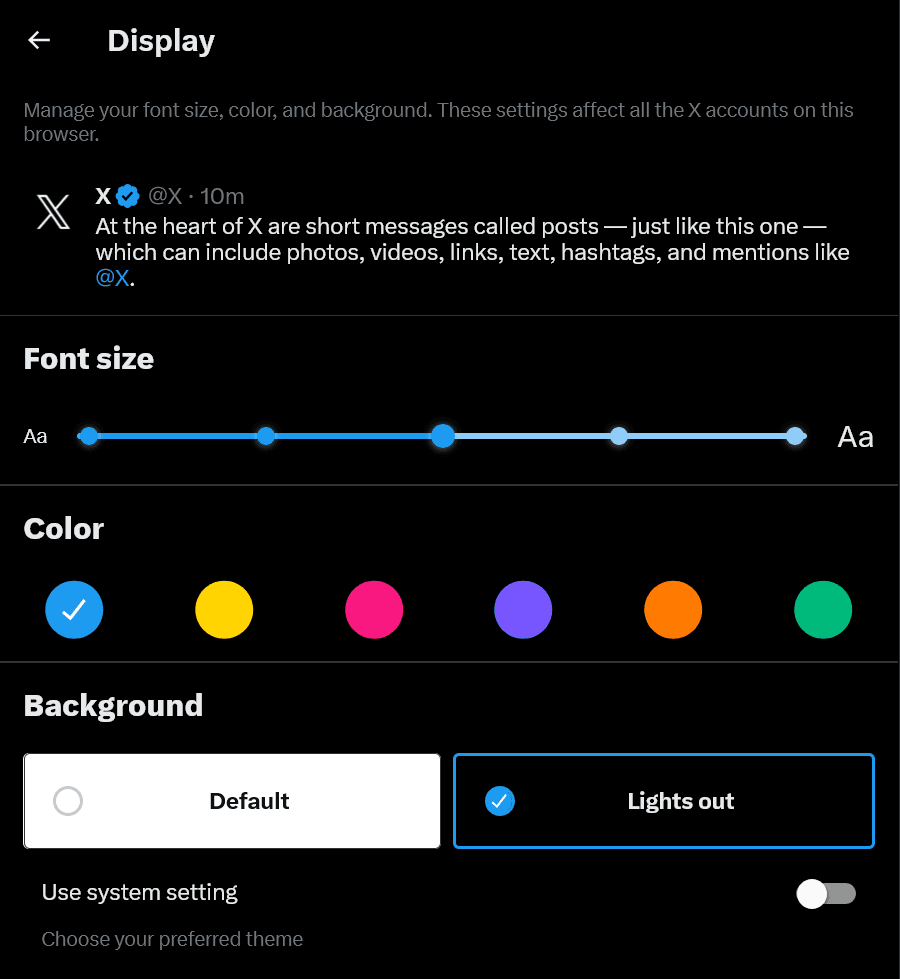
Until now, X’s Dark mode offered two options: “Dim,” based on dark blue, and “Lights out,” based on black.
The Lights out theme has the issue that, due to its nature, it increases screen contrast, but the Dim theme can prevent the contrast from becoming too strong.
For this reason, the Dim theme was popular among some users, but it has been removed from the web version of X.
As of the time of writing, you can still continue to use the Dim theme in the X mobile app.
Nikita Bier, X’s Head of Product, posted about this, saying that while they currently don’t have the capacity to support more than two colors, they are considering making Lights out brighter.
In other words, the reason Dim was removed from X’s web client is a lack of internal development resources at X.
How to restore Dim
Control Panel for Twitter, a browser extension that makes X easier to use, implemented a feature in v4.22.0 to restore Dim.
As of the time of writing, Control Panel for Twitter v4.22.0 can only be used on Edge, but it is expected to become available for other browsers soon.
If you want to use Dim right away, you can paste the CSS introduced in this post into a browser extension called Stylus to make Dim available again.
【修正版】微妙に従来の色が残ってる箇所があったので修正版です
— Torishima / INTP (@izutorishima) February 12, 2026
```
body, .r-kemksi, [style*="background-color: rgb(0, 0, 0);"] {
background-color: rgb(21, 32, 43) !important;
}
.r-5zmot {
background-color: rgb(21, 32, 43, 0.65) !important;
}
.r-1kqtdi0, .r-1roi411,…
When using Stylus, configure it with the following steps.
Install Stylus in your browser
Open X
Click the Stylus icon and create a style for [x.com]

The style editor will appear, so paste the CSS introduced in the post mentioned earlier and save it
Conclusion
Of X’s Dark mode themes, “Lights out” and “Dim,” Dim was removed due to a lack of development resources.
You can restore Dim by installing a browser extension such as Stylus and setting up a style, or by using Control Panel for Twitter.
Share this article
Follow us for updates
Adding us to your preferred sources on Google makes it easier to find our articles on Google. Also, be sure to follow us on X and our RSS feed.


-1.png&w=1080&q=75)
I've been using JavaScript more than my native language since birth. I am nowhere and everywhere on the internet.
I build web apps and browser extensions in TypeScript as a web frontend programmer. I released Shadowban Scanner, a tool that detects shadowbans on X, and Restore Link Card, a tool that brings back link cards. Media outlets in Japan and abroad covered both tools. For iGEM 2023, I built the Wiki for Team Japan-United and helped the team win the Grand Prize. On my blog, I cover news about X and social media, test and troubleshoot bugs, and share frontend development insights.



![[新しいXチャットへようこそ]というテキストが画面に大きく表示されており、その下には次の3つの説明が表示されている。[エンドツーエンドの暗号化:メッセージは、端末にかかわらずエンドツーエンドで暗号化されています。][最先端のプライバシー:Xを含め、他の人がメッセージを読むことはできません。][パスコードを設定:メッセージを保護するため、4桁のパスコードを設定してください。]これらの説明の下には、[パスコードを作成]という大きなボタンが配置されている](/_next/image/?url=%2Fapi%2Fmedia%2Ffile%2Fwelcome-to-new-chat.png&w=1920&q=75)