
Bug with X search source: command not working correctly and how to work around it
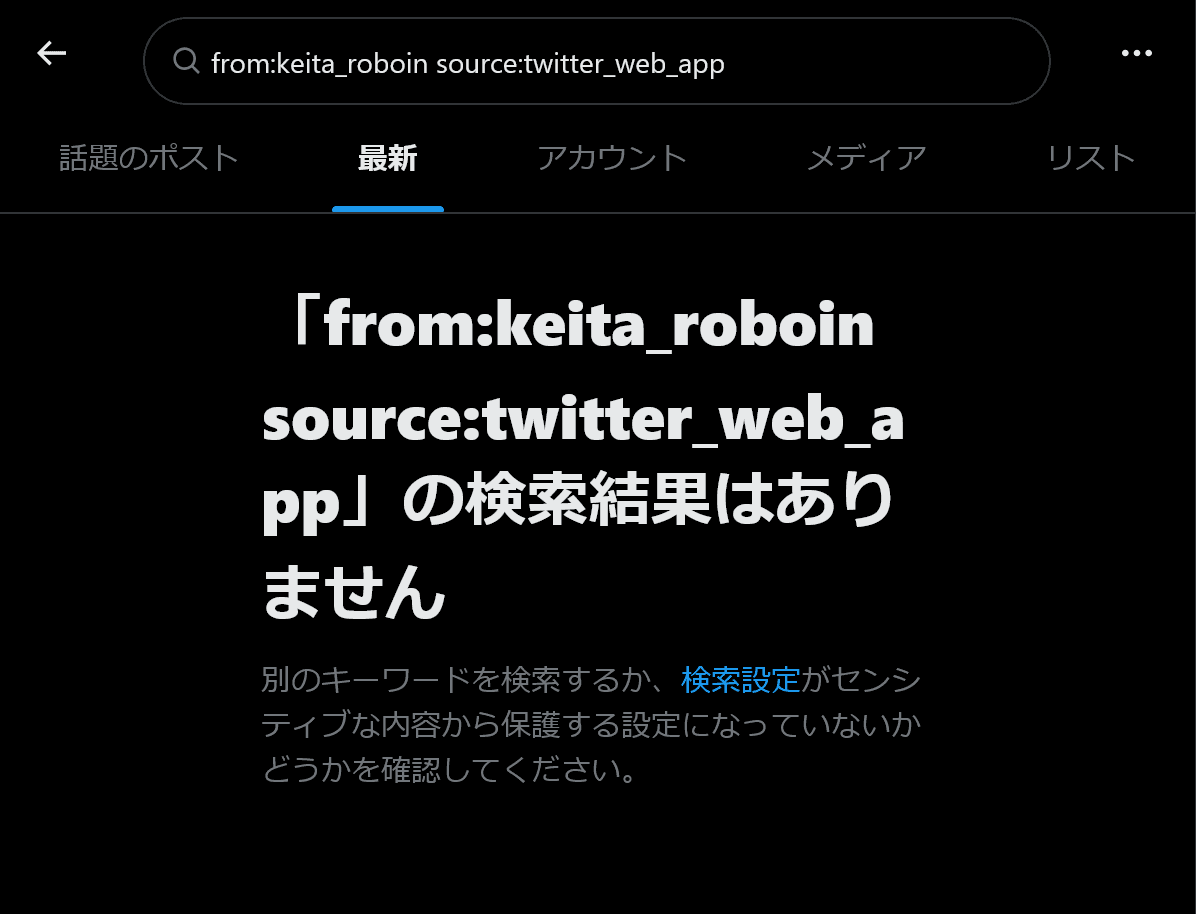
In X (Twitter) search, a bug is occurring where adding search operators (search commands) such as source:twitter_web_app or source:twitter_for_iphone to a search query causes the [Latest] tab to show no results, or causes posts containing the string “source:twitter_web_app” to appear.
There is currently no complete fix for this bug, but you can view some search results by using the [Top] tab.
Table of Contents
What is the source: operator?
X provides a source: search operator that lets you filter posts by the app or environment they were posted from.
Common filters are as follows:
- Posts published from the web version:
source:twitter_web_app - Posts published from the iPhone app:
source:twitter_for_iphone - Posts published from the Android app:
source:twitter_for_android
This search operator, written in the form source:<client_name>, lets you filter X posts by the client they were posted from.
The major official clients are listed above, but for posts automatically published from apps and similar services, it may also be possible to filter by the app name, with spaces replaced by underscores.
Using the source: operator in the [Latest] tab causes search results not to appear
Currently, when source: is included in a search query on X, a bug can cause the [Latest] tab to show no posts at all, or cause the source: operator to be treated as a search string rather than an operator.
For example, searching for lang:ja source:twitter_web_app should normally display Japanese posts published from the web.
At present, however, when the search query includes the source: operator, the [Latest] tab may return empty results, making it impossible to view posts in chronological order, or it may display posts that contain the text “source:twitter_web_app.”
In other words, with lang:ja source:twitter_web_app, Japanese posts containing the text “source:twitter_web_app” may be displayed regardless of where they were posted from.
This bug is likely caused by the source: search operator being interpreted as a search string rather than as an operator.
If no posts containing text such as “source:twitter_web_app” are found, the search results may appear empty.
X is also experiencing similar issues where some search results do not appear, or posts from the most recent seven days are not displayed.

Workaround for using the source: operator
This bug occurs only in the [Latest] tab of search results and does not occur in the [Top] tab.
Therefore, by opening the [Top] tab instead of the [Latest] tab, you can view search results with the source: operator applied.
In the [Top] tab, posts are not sorted chronologically, and some posts may not be displayed.
If you want to check recent posts, using the since: operator as well is recommended.
For example, to search for Japanese posts published from the web on or after May 28, 2026, search for lang:ja source:twitter_web_app since:2026-05-28 and open the [Top] tab.
Because this is the [Top] tab, posts are not necessarily sorted chronologically, but filtering by date lets you view only recent posts.
Conclusion
A bug is occurring in X search where using the source: operator causes search results not to appear in the [Latest] tab, or causes posts containing the string “source:” to be displayed instead.
Search results appear without issue in the [Top] tab, so using the [Top] tab is recommended.
To limit results to recent posts, you can combine it with the since: operator to filter search results by date.
Verification details
Verification environment
Mobile
- OS: Android 17
- Device: Google Pixel 8
- Apps: X for Android version 11.98.0-beta.0 and X Lite for Android version 11.98.3-release.01
PC
- OS: Windows 11
- Browser: Zen Browser version 1.20.2b
Verification details
I confirmed that the source: command does not work in the [Latest] tab in the X for Android app, the X Lite for Android app, or the web version, while it does work in the [Top] tab.
Last verification date
Changelog
- May 29, 2026: Initial publication
- June 9, 2026: Added the verification environment
Share this article
Follow us for updates
Adding us to your preferred sources on Google makes it easier to find our articles on Google. Also, be sure to follow us on X and our RSS feed.


Related articles
- Why your X poll might not be showing up, and what to do if the vote count seems low
- Is X preventing your posts? How to delete accumulated unsent drafts
- X is currently experiencing a bug that prevents posting over Wi-Fi: Causes and fixes when you cannot post
- What is X’s [Snooze Topics]? How to use it and why you may not be able to snooze topics
- Why X group chat invites fail and how to fix the problem
-1.png&w=1080&q=75)
I've been using JavaScript more than my native language since birth. I am nowhere and everywhere on the internet.
I build web apps and browser extensions in TypeScript as a web frontend programmer. I released Shadowban Scanner, a tool that detects shadowbans on X, and Restore Link Card, a tool that brings back link cards. Media outlets in Japan and abroad covered both tools. For iGEM 2023, I built the Wiki for Team Japan-United and helped the team win the Grand Prize. On my blog, I cover news about X and social media, test and troubleshoot bugs, and share frontend development insights.
![スマートフォンのホーム画面の[Social]フォルダーを表示した写真。フォルダー内にはFacebook、Instagram、Threads、X、LinkedIn、TikTok、YouTubeのアイコンが配置されている](/_next/image/?url=%2Fapi%2Fmedia%2Ffile%2Ffacebook-instagram-threads-x-twitter-linkedin-tiktok-youtube-mobile-app-unsplash.jpg&w=3840&q=75)
![Screenshot of the dialog that says [Snooze Topics] [Select topics you don’t want to see for 24 hours]](/_next/image/?url=%2Fapi%2Fmedia%2Ffile%2Fx-snooze-topic-dialog-english.png&w=1920&q=75)









