
Why X group chat invites fail and how to fix the problem

Sometimes, when you try to invite someone to a group chat in XChat (formerly DMs), they can’t be added or the invite won’t go through.
In this article, I’ll clearly explain the reasons you may not be able to add or invite someone to an X group chat, along with how to fix each one.
Table of Contents
What to check first
If you can’t add someone to an X group chat, start by checking these three things:
- Whether the other person has migrated from DMs to XChat
- Whether the other person’s settings allow them to receive messages from you
- Whether message-sending limits or account restrictions are in effect
In particular, traditional DMs have recently been integrated into XChat, the new messaging service, and that transition is one reason some users can’t be added.
From here, I’ll walk through each case and how to deal with it.
Reasons you can’t add someone to a group chat and how to fix them
1. The other person hasn’t moved to the new XChat yet
XChat supports more than just text messages. It also lets users send and receive files, and it includes message encryption.
Overall, compared with the old DM system, XChat offers stronger security and privacy, along with a range of useful new features.
XChat keeps messages encrypted by default, but to use that encryption, users need to set a passcode.
If they haven’t set a passcode, they can’t use XChat and therefore can’t join group chats.
If you see the error message [This user needs to upgrade to the new XChat], this is likely the reason.
How to fix it
The other person needs to move to XChat.
Migrating to XChat is simple: they just need to update the X app and set a passcode.
A detailed guide is available in the article below, so it’s a good idea to share it with them.
Also, if they haven’t moved to XChat yet, they won’t be able to receive messages sent through XChat (DMs), so it may be better to let them know via a reply or mention instead.
![[新しいXチャットへようこそ]というテキストが画面に大きく表示されており、その下には次の3つの説明が表示されている。[エンドツーエンドの暗号化:メッセージは、端末にかかわらずエンドツーエンドで暗号化されています。][最先端のプライバシー:Xを含め、他の人がメッセージを読むことはできません。][パスコードを設定:メッセージを保護するため、4桁のパスコードを設定してください。]これらの説明の下には、[パスコードを作成]という大きなボタンが配置されている](/_next/image/?url=%2Fapi%2Fmedia%2Ffile%2Fwelcome-to-new-chat.png&w=1920&q=75)
2. The other person’s settings don’t allow them to receive DMs from you
On X, not everyone can freely send messages to anyone else.
XChat/DMs include settings that control whose message requests a user will accept, and depending on the other person’s settings, you may not be able to message them.
For example, if they do not follow you and their [Allow message requests from] setting is set to [None], you will not be able to send them a message.
Likewise, if their setting is limited to [Verified users] and you are not a verified account (in other words, you are not subscribed to at least the Premium tier of X Premium), you will not be able to send them a message.
How to fix it
You can check whether you are able to send a message request by opening the other person’s profile.
If a message icon appears on their profile, you are able to send a request. If it does not appear, you are not.
If message request settings are the issue, you may be able to invite them to the group chat after they follow you or after they change their settings to allow requests.
A detailed walkthrough is available in the article below.
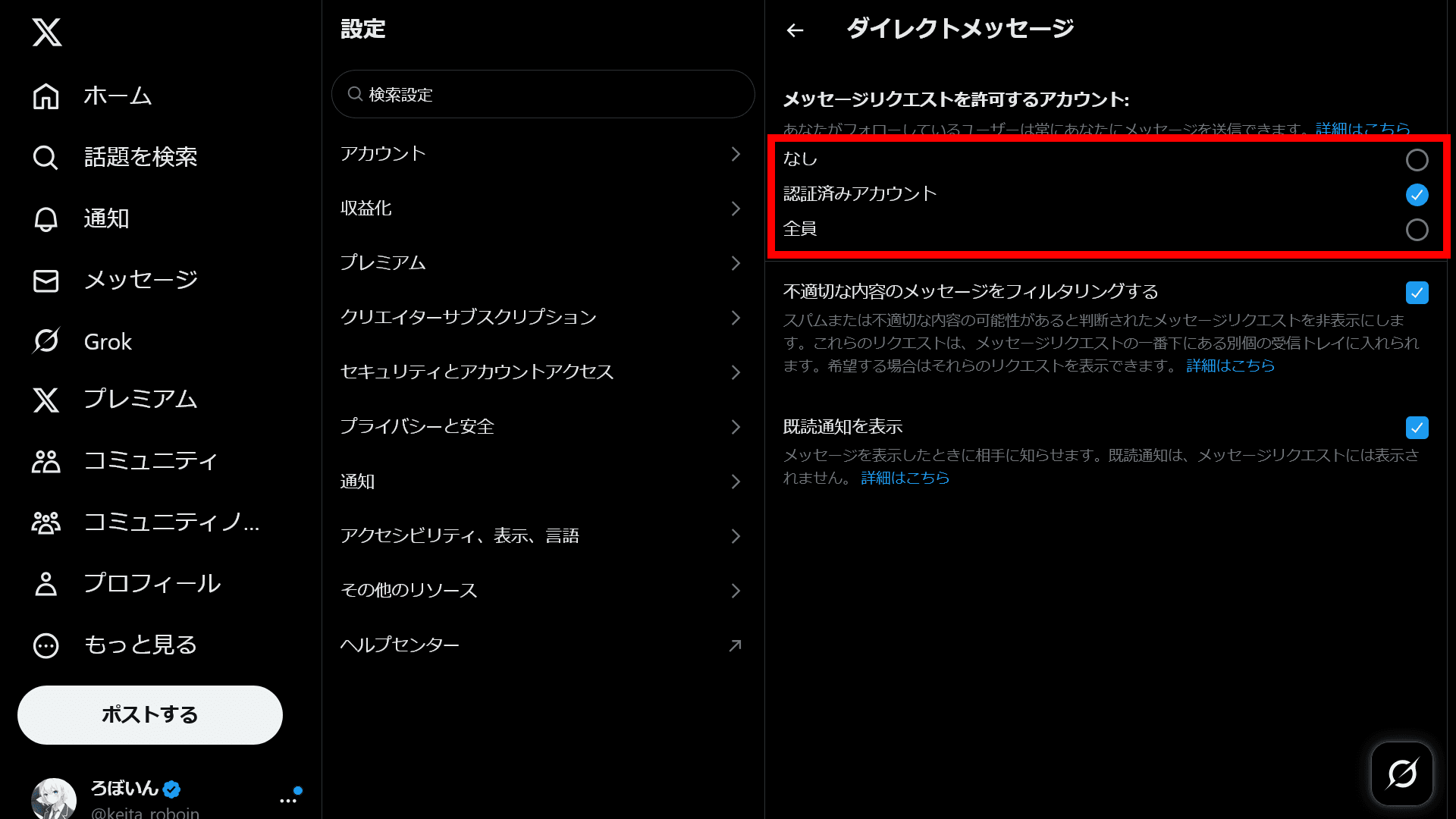
3. The other person hasn’t approved your request
Even if the other person’s settings allow them to receive message requests, you still won’t be able to chat with them on XChat unless they manually approve the request.
When you message someone on XChat for the first time, the message usually appears in their Requests tab rather than in the normal DM inbox.
How to fix it
In this case, the other person needs to approve the message request by following these steps:
Open X Chat
Switch the top-right tab from [All] to [Requests]
Open the relevant message and click [Accept]
4. You’ve hit the message-sending limit
As an anti-spam measure, X prevents users from sending large numbers of messages in a short period of time.
If you send too many messages in a short time, or repeatedly send similar messages to multiple users, you may temporarily lose the ability to send messages.
How to fix it
Try the following:
- Wait a while and try again later
- Avoid sending the same text repeatedly
- Do not invite a large number of people at once
- Verify your phone number if you have not done so yet
5. Your account is restricted
If X detects suspicious activity, it may temporarily restrict your account.
When that happens, it can also affect your ability to add people to group chats.
How to fix it
Check the following:
- See whether you have received any notifications asking you to verify or authenticate your account
- Complete verification for your phone number or email address
- Avoid sending a large number of messages, likes, reposts, or similar actions in a short period of time
- Wait for the restriction to be lifted
6. The group chat has reached its participant limit
Group chats have a maximum participant limit, and users cannot join once that limit has been exceeded.
At the time of writing, the limit is 350 people, with an expansion to 1,000 planned within a few weeks.
Most groups are unlikely to run into this limit, but in larger group chats, this may be the reason.
How to fix it
There is no way to bypass the participant limit for a group chat.
You will need to check the current number of participants in the group and either remove unnecessary members or create a separate new group chat.
7. You’ve been blocked by the other person
If the other person has blocked you, you will not be able to send them an invite.
It is also possible that you have blocked them, or that they have blocked you.
How to fix it
Check the following:
- Make sure you have not blocked the other person
- Make sure the other person has not blocked you
- Make sure you have not blocked messages from the other person
In addition to account-level blocking, X also has a feature that blocks only messages from a specific user, so you should check whether that kind of message-only block is involved as well.
Conclusion
I’ve explained the possible reasons you may not be able to invite someone to an XChat group chat, along with the corresponding fixes.
There are several possible causes, but the first things to check are whether the other person has completed the initial XChat setup and whether their message reception settings allow you to contact them.
Share this article
Follow us for updates
Adding us to your preferred sources on Google makes it easier to find our articles on Google. Also, be sure to follow us on X and our RSS feed.


-1.png&w=1080&q=75)
I've been using JavaScript more than my native language since birth. I am nowhere and everywhere on the internet.
I build web apps and browser extensions in TypeScript as a web frontend programmer. I released Shadowban Scanner, a tool that detects shadowbans on X, and Restore Link Card, a tool that brings back link cards. Media outlets in Japan and abroad covered both tools. For iGEM 2023, I built the Wiki for Team Japan-United and helped the team win the Grand Prize. On my blog, I cover news about X and social media, test and troubleshoot bugs, and share frontend development insights.

![ChatGPTの設定画面の[パーソナライズ]タブのスクリーンショット](/_next/image/?url=%2Fapi%2Fmedia%2Ffile%2Fimage-1423.png&w=2048&q=75)









![スマートフォンのホーム画面の[Social]フォルダーを表示した写真。フォルダー内にはFacebook、Instagram、Threads、X、LinkedIn、TikTok、YouTubeのアイコンが配置されている](/_next/image/?url=%2Fapi%2Fmedia%2Ffile%2Ffacebook-instagram-threads-x-twitter-linkedin-tiktok-youtube-mobile-app-unsplash.jpg&w=3840&q=75)