
Why did the whoo app disappear, and why can’t you download it?
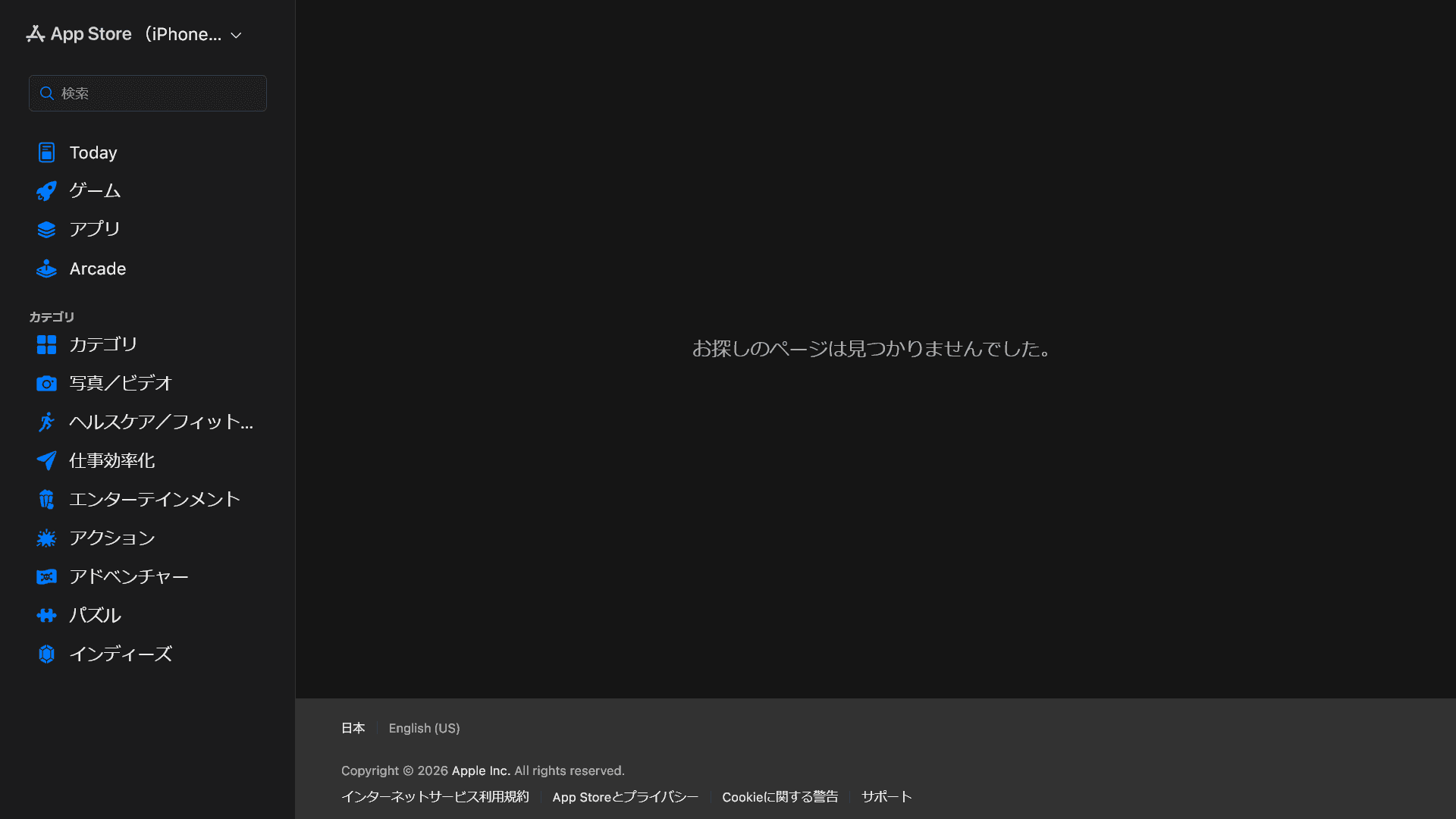
The location-sharing app whoo has been removed from Apple’s iOS App Store, so new users cannot download it.
Some users have speculated that whoo is shutting down, but the developer has denied those rumors. The Android app also remains available, which suggests that a temporary issue caused the removal.
Table of Contents
Apple removed whoo from the App Store
Whoo, a popular location-sharing app, has more than 1 million downloads on the Google Play Store at the time of writing.
The iOS version, however, has disappeared from the App Store, preventing new downloads. If you open the whoo App Store page, Apple displays the message, “The page you’re looking for can’t be found.”
Some users have speculated that whoo is ending its service, but the developer has denied those claims, and the Android app remains listed on the Google Play Store. On August 6, the official whoo account on X posted that the service was not shutting down and asked users to wait a little longer. On August 9, the account also promised that the app would return.
Based on those statements and the continued availability of the Android version, a temporary issue appears to have caused whoo’s removal from the App Store rather than a shutdown of the service.
Did a developer account issue cause the removal?
LinQ, the company behind whoo, has not issued an official statement explaining why Apple removed the app from the App Store. The exact cause therefore remains unknown.
My research suggests that the issue may involve LinQ’s Apple developer account.
The LinQ developer page on the App Store still exists, but it no longer lists any apps. A Wayback Machine snapshot from February 2026 shows five apps under LinQ’s developer account: POY, whoo, Ninjar, DramaTik, and TOMATE. This means Apple has removed LinQ’s other apps from the App Store as well.
You can see this type of behavior when an Apple Developer Program membership expires or when Apple applies an account-level restriction or review measure. Without an official statement, no one outside LinQ or Apple can confirm the cause. Based on the available evidence, however, LinQ may have encountered an issue with its developer account.
What happens if you already installed the app?
Apple’s removal of whoo from the App Store prevents new installations. If you already have whoo installed, you can continue using it.
Verification details
Verification details
I reviewed and cross-checked multiple sources, including statements from whoo’s official X account, LinQ’s developer page on the App Store, and archived copies of that page from the Wayback Machine.
Last verification date
Share this article
Follow us for updates
Adding us to your preferred sources on Google makes it easier to find our articles on Google. Also, be sure to follow us on X and our RSS feed.


-1.png&w=1080&q=75)
I've been using JavaScript more than my native language since birth. I am nowhere and everywhere on the internet.
I build web apps and browser extensions in TypeScript as a web frontend programmer. I released Shadowban Scanner, a tool that detects shadowbans on X, and Restore Link Card, a tool that brings back link cards. Media outlets in Japan and abroad covered both tools. For iGEM 2023, I built the Wiki for Team Japan-United and helped the team win the Grand Prize. On my blog, I cover news about X and social media, test and troubleshoot bugs, and share frontend development insights.


![YouTubeハイライトのスクリーンショットが3つ並んだ画像。左のスクリーンショットには[2025 YOUTUBE RECAP]と書かれており、中央のスクリーンショットには[Your top interests]と書かれている。右のスクリーンショットにはもっとも視聴したチャンネルとして[Rene Ritchie]が挙げられている](/_next/image/?url=%2Fapi%2Fmedia%2Ffile%2Fyoutube-recap-thumbnail.png&w=3840&q=75)





![An image showing a drawer titled [Scheduled post] with a calendar on X’s post screen](/_next/image/?url=%2Fapi%2Fmedia%2Ffile%2Fx-ios-scheduled-post-thumbnail.png&w=3840&q=75)

![[Draw blur]と表示されたXの新しい画像エディター画面のスクリーンショット。上部に戻る、切り抜き、テキスト、描画、ぼかし、保存の各アイコンが並んでいる](/_next/image/?url=%2Fapi%2Fmedia%2Ffile%2Fx-new-photo-editor.jpeg&w=3840&q=75)