Can't see quote reposts on X? Web version specification change: What's the new way to check?
The specifications of the web version of X (Twitter) have changed, and the way to check quote reposts has been updated.
In this article, we explain the new way to check quote reposts on the web version of X.
Table of Contents
Can’t see quote reposts anymore?
In the previous web version of X, as explained in this article, you could display quote reposts by clicking the repost button and selecting [Show quotes] from the menu that appeared.
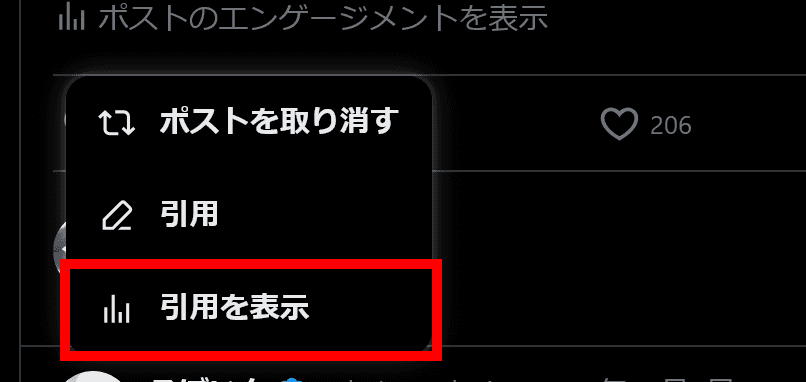
However, due to changes in X’s specifications, the [Show quotes] button has been removed, and quote reposts can no longer be checked using this method.
So, how can you display quote reposts now?
New way to check quote reposts
In the web version of X after the specification change, you can check quote reposts using the following steps.
Click the post for which you want to check quote reposts
If a button labeled [View activity] appears below the reply and repost buttons, click it
![A screenshot of X's post, showing a [Relevant] dropdown menu and a [View activity] button below the reply, repost, and other buttons.](/_next/image/?url=%2Fapi%2Fmedia%2Ffile%2Fx-web-view-activity-button-english.png&w=1920&q=75)
If [View activity] is not visible, click the menu button at the top right of the post and select [View post activity]
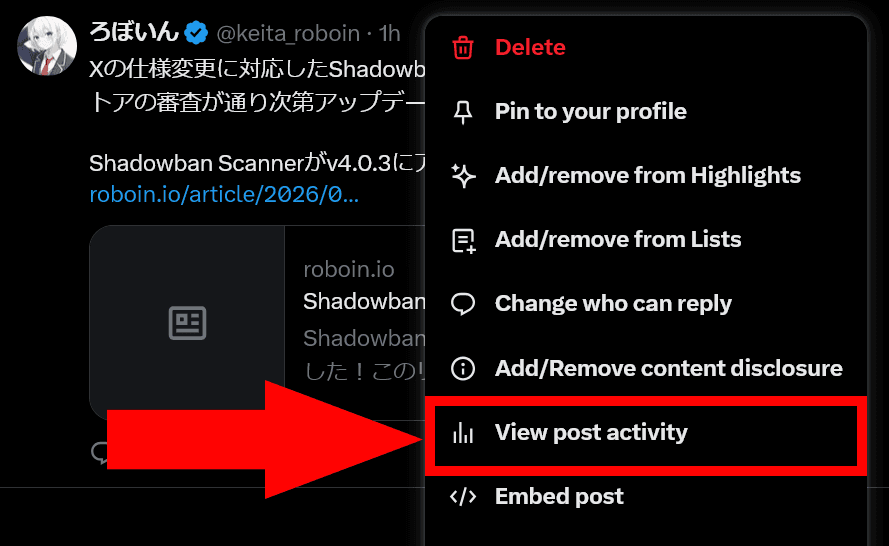
Quote reposts will be displayed
What if you can’t see all quotes?
Even if you check quote reposts using this method, some quote reposts may not be displayed.
In that case, by using the method introduced in the section “What if you can’t see all quotes?” of this article, you will be able to display almost all quote reposts.
Conclusion
Due to changes in the specifications of the web version of X, quote reposts can no longer be displayed using the previous method.
After the specification change, you can check quote reposts by clicking the [View activity] button that appears after clicking a post, or by clicking the [View post activity] button from the menu button at the top right of the post.
Share this article
Follow us for updates
Adding us to your preferred sources on Google makes it easier to find our articles on Google. Also, be sure to follow us on X and our RSS feed.


-1.png&w=1080&q=75)
I've been using JavaScript more than my native language since birth. I am nowhere and everywhere on the internet.
I build web apps and browser extensions in TypeScript as a web frontend programmer. I released Shadowban Scanner, a tool that detects shadowbans on X, and Restore Link Card, a tool that brings back link cards. Media outlets in Japan and abroad covered both tools. For iGEM 2023, I built the Wiki for Team Japan-United and helped the team win the Grand Prize. On my blog, I cover news about X and social media, test and troubleshoot bugs, and share frontend development insights.