Why Grok shows “High Demand” and how to fix it
When you ask Grok a question, you may sometimes see a [High Demand] message and get no response.
In this article, I’ll explain in plain language why Grok shows [High Demand] and what you can do about it.
Table of Contents
What does [High Demand] mean in Grok?
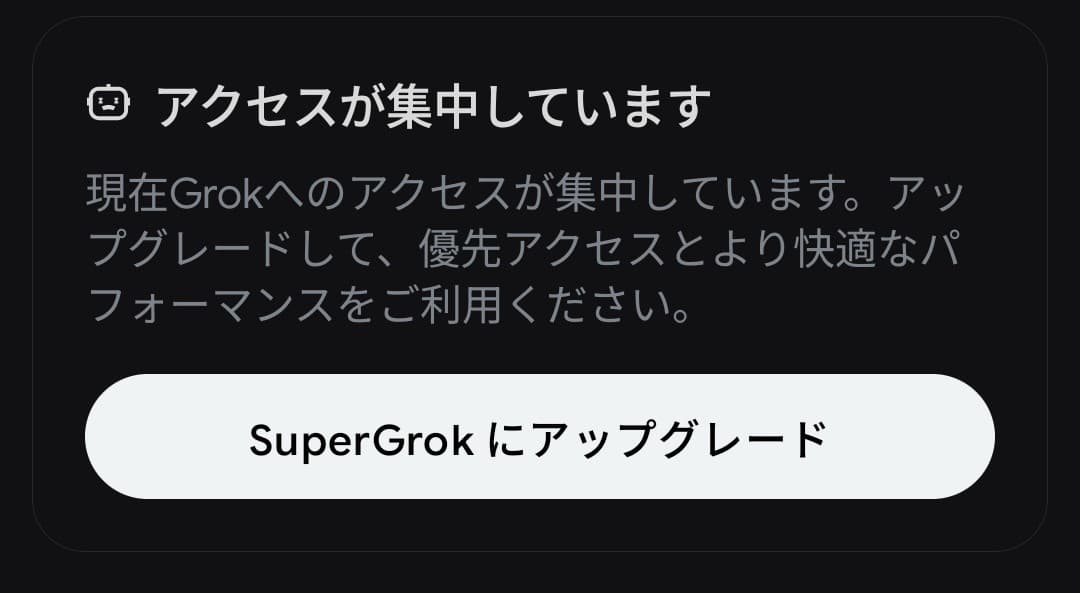
Recently, Grok has started showing messages like the following more often.
High Demand
Grok is under heavy usage right now. Upgrade your plan for priority access and better performance.
Try SuperGrok for free
The [High Demand] message appears when a large number of users are using Grok at the same time, causing congestion, or when your account’s usage tier does not allow your request to be processed immediately.
Causes
Too many users are accessing Grok
Running a generative AI system like Grok requires an enormous amount of computation.
When large numbers of users try to use Grok at the same time, requests can pile up, and X’s servers may not be able to process all of them. As a result, some requests may be rejected.
You are using a free account or a lower-tier paid plan
Grok sets usage limits and priority levels by plan. If you subscribe to X Premium, you may be able to use it more often and receive priority access.
Because paid users are given preferential access, free accounts and lower-tier paid plans may be deprioritized during periods of heavy traffic and may not be able to use Grok.
How to fix it
If you see the High Demand message and cannot use Grok, the following approaches may help.
Try again
First, try sending the same message again.
In my case, even when High Demand appears, I can usually use Grok without any problem just by resending the message right away. If that does not work, wait a while and try again later.
Because the issue is usually caused by temporary congestion, it should start working again after some time.
Use a different environment
Grok is available in several different environments, and traffic conditions may vary depending on where you use it.
You can access Grok from the following environments, so if you see High Demand in one place, it may still work in another:
- Grok’s website
- The Grok mobile app
- Grok inside the X app
- Grok on the web version of X
For example, if it does not work in the Grok app, try using Grok inside the X app. If it does not work inside the X app, try the Grok app instead.
Upgrade to a paid plan
Because paid accounts are given priority over free accounts, and higher-tier plans are prioritized over lower-tier ones, upgrading from a free account can be one option.
I use the mid-tier X Premium plan, and while I occasionally see the [High Demand] message, simply resending the message usually lets me continue without any issue.
Why High Demand messages are becoming more common
In the past, it was rare to see [High Demand] in Grok, but recently it has started appearing more often.
Neither X nor xAI has made an official announcement explaining why this is happening, but several possible reasons come to mind:
- X is using Grok more aggressively in the For You timeline
- Custom timelines and topic snoozing have been introduced
- Server resources are being rented out to other companies
Recently, X has been moving toward having Grok read and classify all posts.
The For You timeline now appears to use Grok to analyze posts and show each user content tailored to them.
On top of that, X has introduced custom timelines, which let users pin topic-specific timelines to Home, and a topic snooze feature, which prevents unwanted topics from appearing in the For You timeline for 24 hours.
![Screenshot of the dialog that says [Snooze Topics] [Select topics you don’t want to see for 24 hours]](/_next/image/?url=%2Fapi%2Fmedia%2Ffile%2Fx-snooze-topic-dialog-english.png&w=1920&q=75)
Custom timelines work by using Grok to classify posts from around the world into more than 75 topics and then generating a personalized timeline for each user.
Implementing features like these requires more than simple keyword matching. Grok needs to understand the content and context of posts in order to classify them.
Running a generative AI system like Grok requires massive computing resources, but those resources are finite. That means the more X uses Grok internally, the fewer resources may remain available for user conversations with Grok.
On top of that, xAI, which develops and operates Grok, is also leasing GPUs, the hardware used to run generative AI, to the company behind the AI code editor Cursor.
Some reports say xAI plans to provide Cursor with GPU infrastructure on the scale of tens of thousands of units.
If server capacity is being rented out to other companies, then the computing resources available for Grok naturally become more limited.
Taken together, these factors likely reduce the number of requests Grok can handle, which may explain why the High Demand message is appearing more often.
Conclusion
This article explained why Grok may show a [High Demand] message and fail to return a response, along with ways to deal with it.
This error message is caused by heavy traffic to Grok, and in some cases you may be able to use it again by waiting a while before trying again or by accessing it from a different environment.
Verification details
Verification environment
- OS: Android 17
- Device: Google Pixel 8
- App: Grok for Android version 1.1.83-release.00
Verification details
While using the Grok app with an X account on the Premium tier of X Premium, I confirmed that the app may display [High demand] and that sending the message again allows Grok to process it.
Last verification date
Changelog
- April 24, 2026: Published the initial version
- June 12, 2026: Added the verification environment
Share this article
Follow us for updates
Adding us to your preferred sources on Google makes it easier to find our articles on Google. Also, be sure to follow us on X and our RSS feed.


-1.png&w=1080&q=75)
I've been using JavaScript more than my native language since birth. I am nowhere and everywhere on the internet.
I build web apps and browser extensions in TypeScript as a web frontend programmer. I released Shadowban Scanner, a tool that detects shadowbans on X, and Restore Link Card, a tool that brings back link cards. Media outlets in Japan and abroad covered both tools. For iGEM 2023, I built the Wiki for Team Japan-United and helped the team win the Grand Prize. On my blog, I cover news about X and social media, test and troubleshoot bugs, and share frontend development insights.
![Xのポストの投稿画面に[Made with AI]というラベルが表示されているスクリーンショット](/_next/image/?url=%2Fapi%2Fmedia%2Ffile%2Fx-made-with-ai-label.png&w=1920&q=75)
![タイムラインの上部にGrokのロゴと[What do you want to see more of?]というテキストが表示されており、その下のテキストボックスに[More funny content, less politics]と入力されている画面のスクリーンショット](/_next/image/?url=%2Fapi%2Fmedia%2Ffile%2Fx-grok-promptable-timeline-prototype.png&w=1920&q=75)


![[Draw blur]と表示されたXの新しい画像エディター画面のスクリーンショット。上部に戻る、切り抜き、テキスト、描画、ぼかし、保存の各アイコンが並んでいる](/_next/image/?url=%2Fapi%2Fmedia%2Ffile%2Fx-new-photo-editor.jpeg&w=3840&q=75)
![ChatGPTの設定画面の[パーソナライズ]タブのスクリーンショット](/_next/image/?url=%2Fapi%2Fmedia%2Ffile%2Fimage-1423.png&w=2048&q=75)