
Reports of X expanded bios disappearing are increasing: possibly a data retrieval bug

Reports are increasing that profiles set in X's Expanded Bio have disappeared.
There has been no official announcement from X about this issue, but it appears that a malfunction is occurring in the process of retrieving data.
Table of Contents
What is the Expanded Bio?
X has a feature called the Expanded Bio.
When you use the Expanded Bio, a [View more] button is added to your profile, allowing you to display a longer profile than usual.
With the Expanded Bio, you can set a long self-introduction that does not fit in the normal profile, and you can also use decorations such as headings, bold, and italics.
You can also set links, which is convenient for including links to your portfolio or website.
For more details on the overview and how to use the Expanded Bio, see this article.
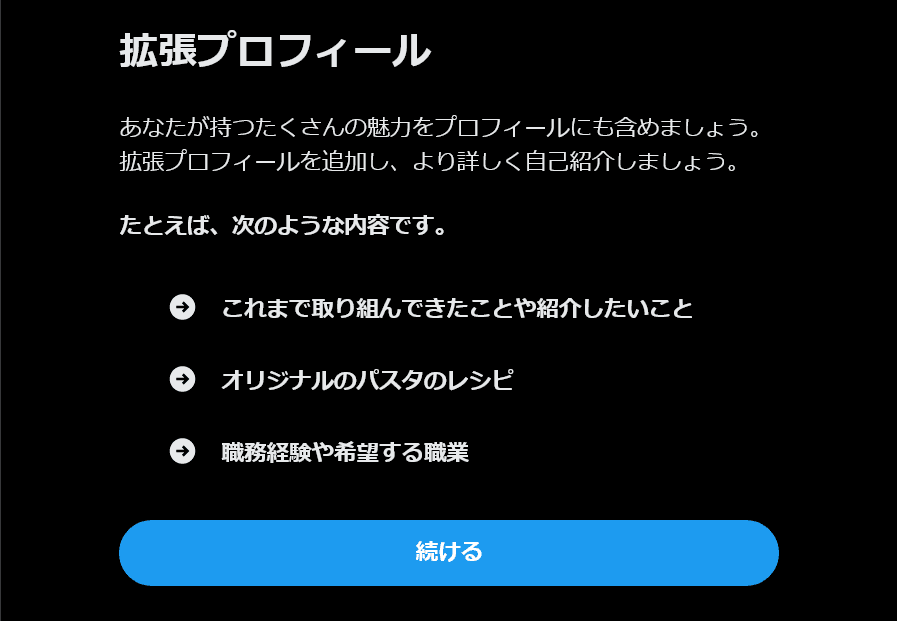
Reports of the Expanded Bio disappearing are increasing
On X, reports have been increasing since a few days ago that the Expanded Bio can no longer be displayed.
When I actually checked, for accounts that already had an Expanded Bio set up, the [View more] button still appeared on the profile, but even when clicking the button, only an empty profile was displayed.
Also, when opening the Expanded Bio editor, the content of the Expanded Bio that should have been set is in a reset state.
Is the cause a bug in the data retrieval process?
There has been no official announcement from X about this issue, but I suspect it is a bug in the data retrieval process.
There is information that even if you set a new Expanded Bio, it does not improve, and the Expanded Bio still does not display.
Considering that the [View more] button appears on the profiles of accounts that have an Expanded Bio set, it is highly likely that the Expanded Bio data exists, but a malfunction is occurring in the data retrieval process.
At this time, there is no workaround that users can perform, but if this hypothesis is correct, it is important to leave it as is without editing the Expanded Bio.
If you edit the Expanded Bio, you may overwrite existing data, but if you leave it without editing, it may be possible that the previous Expanded Bio will be displayed again when the issue is resolved.
I'm currently reporting this issue in X's official community and plans to update this article as progress is made.
If you like or repost the post I made to the community, it will be more likely to catch the attention of X employees, and the probability of a faster fix may increase.
The Expanded Bio is not displayed.
— ろぼいん (@keita_roboin) February 25, 2026
For accounts that have an Expanded Bio set up, the "View more" button appears on the profile, but tapping it does not display the actual content.
Also, when you open the Expanded Bio editor, the content that should have been set up is not… pic.twitter.com/QFJgWkwZwA
Conclusion
A bug has occurred on X where the Expanded Bio that allows you to set a long profile cannot be displayed.
For accounts that have an Expanded Bio set, the [View more] button is displayed, so it does not seem that the Expanded Bio feature has disappeared; rather, it appears that some cause is triggering a malfunction in the data retrieval process.
At this time there is no workaround users can do, but by leaving it as is without editing the Expanded Bio, it may be possible that the original Expanded Bio will be displayed again upon recovery.
Share this article
Follow us for updates
Adding us to your preferred sources on Google makes it easier to find our articles on Google. Also, be sure to follow us on X and our RSS feed.


Next articles
- X sues users accused of exploiting creator revenue sharing to fraudulently obtain about $277,000
- X opens official shadowban checker to all eligible users and adds legal withholding details
- X brings scheduled posts to iOS, with Android support absent
- X search stops showing older posts: why past posts are missing and which posts are affected
- Annoyed by X’s “tap and hold” images? X starts cracking down on them as a “spam attack”
-1.png&w=1080&q=75)
I've been using JavaScript more than my native language since birth. I am nowhere and everywhere on the internet.
I build web apps and browser extensions in TypeScript as a web frontend programmer. I released Shadowban Scanner, a tool that detects shadowbans on X, and Restore Link Card, a tool that brings back link cards. Media outlets in Japan and abroad covered both tools. For iGEM 2023, I built the Wiki for Team Japan-United and helped the team win the Grand Prize. On my blog, I cover news about X and social media, test and troubleshoot bugs, and share frontend development insights.

![An image showing a drawer titled [Scheduled post] with a calendar on X’s post screen](/_next/image/?url=%2Fapi%2Fmedia%2Ffile%2Fx-ios-scheduled-post-thumbnail.png&w=3840&q=75)
![A screenshot of a dialog titled [What are you reporting?] with [Spam] selected](/_next/image/?url=%2Fapi%2Fmedia%2Ffile%2Fx-report-post-spam-selected-english.png&w=1920&q=75)


![[新しいXチャットへようこそ]というテキストが画面に大きく表示されており、その下には次の3つの説明が表示されている。[エンドツーエンドの暗号化:メッセージは、端末にかかわらずエンドツーエンドで暗号化されています。][最先端のプライバシー:Xを含め、他の人がメッセージを読むことはできません。][パスコードを設定:メッセージを保護するため、4桁のパスコードを設定してください。]これらの説明の下には、[パスコードを作成]という大きなボタンが配置されている](/_next/image/?url=%2Fapi%2Fmedia%2Ffile%2Fwelcome-to-new-chat.png&w=1920&q=75)



