How to fix "The driver C:¥Windows¥system32¥drivers¥logi_joy_bus_enum.sys" error when a game will not start
When I tried to launch VRChat on Windows, an error message about "The driver C:¥Windows¥system32¥drivers¥logi_joy_bus_enum.sys" appeared and I could no longer start the game.
After looking into it, it seems that this error has also been occurring in a growing number of cases with games other than VRChat.
Table of Contents
Details of the issue
When I tried to launch VRChat on Windows, the following error message appeared and the game would not start.
Launch Error
The driver C:¥Windows¥system32¥drivers¥logi_joy_bus_enum.sys is loaded, but its file is missing. Please reboot your system to unload the driver.
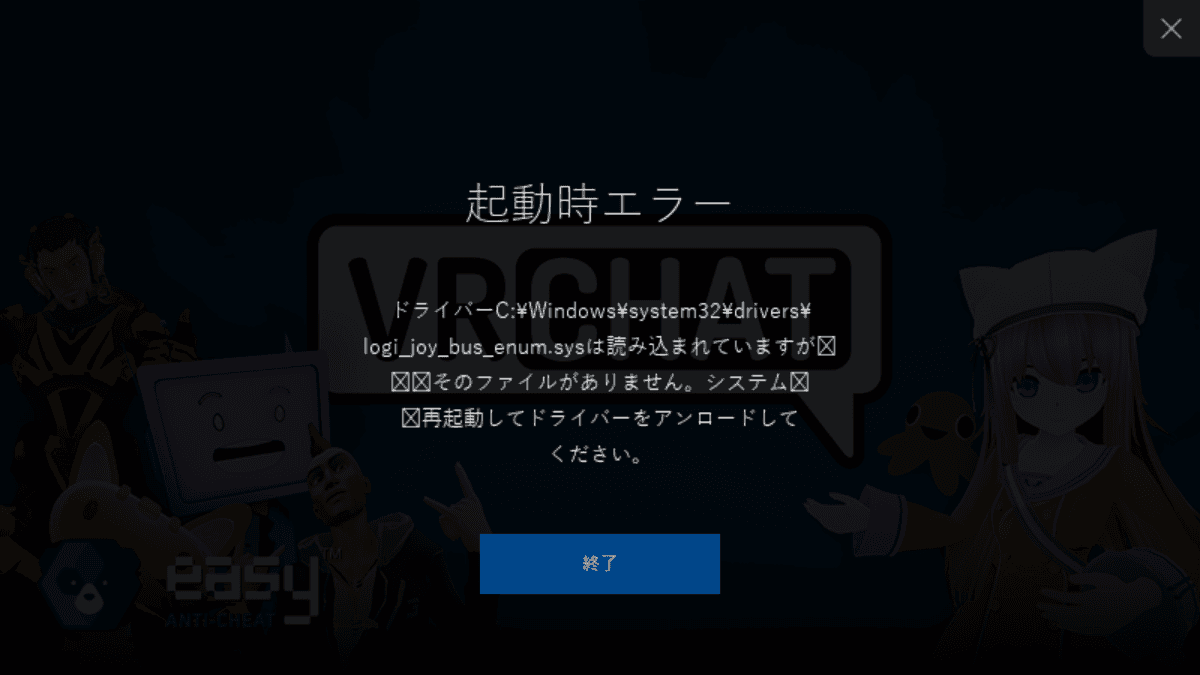
Even after closing SteamVR and VRChat and trying again, I still could not launch it because of the same error.
I also ran [Verify integrity of game files] from the [Installed Files] tab in VRChat's properties on Steam, but it did not resolve the problem.
Cause
As you can tell from the fact that the driver name contains "logi", this error appears to be caused by Logitech software, particularly G HUB.
Since G HUB had been updated between the last time I launched VRChat and this time, I believe that update caused the error to occur.
Solution
As the error message stated to reboot the system and unload the driver, I rebooted my PC, and now I am able to launch VRChat without any issues.
In my environment, rebooting fixed it even with Fast Startup enabled, but if restarting does not fix it, it may be worth disabling Fast Startup and then rebooting.
Share this article
Follow us for updates
Adding us to your preferred sources on Google makes it easier to find our articles on Google. Also, be sure to follow us on X and our RSS feed.


Next articles
- How to fix G HUB stuck on [Loading Localizations] or not working after sleep
- How to composite a VRChat avatar into real-world footage for free, and make a walking video
- Fix released for issue where Logi Options+ and G HUB for macOS would not launch; manual action required
- How to enable Codex remote control with only the Codex CLI and no ChatGPT app
- VRChat fan world Tsukuyomi Tutorial Space, recreating Tsukuyomi’s tutorial from Cosmic Princess Kaguya!, is now available
-1.png&w=1080&q=75)
I've been using JavaScript more than my native language since birth. I am nowhere and everywhere on the internet.
I build web apps and browser extensions in TypeScript as a web frontend programmer. I released Shadowban Scanner, a tool that detects shadowbans on X, and Restore Link Card, a tool that brings back link cards. Media outlets in Japan and abroad covered both tools. For iGEM 2023, I built the Wiki for Team Japan-United and helped the team win the Grand Prize. On my blog, I cover news about X and social media, test and troubleshoot bugs, and share frontend development insights.
![G HUBのウィンドウの中央に「G」ロゴが表示されており、その下にはプログレスバーと[ローカライゼーションを読み込み中]というテキストが表示されている](/_next/image/?url=%2Fapi%2Fmedia%2Ffile%2Fg-hub-loading-localizations-screen.png&w=3840&q=75)