
xAI brings Grok to PowerPoint with support for slide creation, research, and image generation
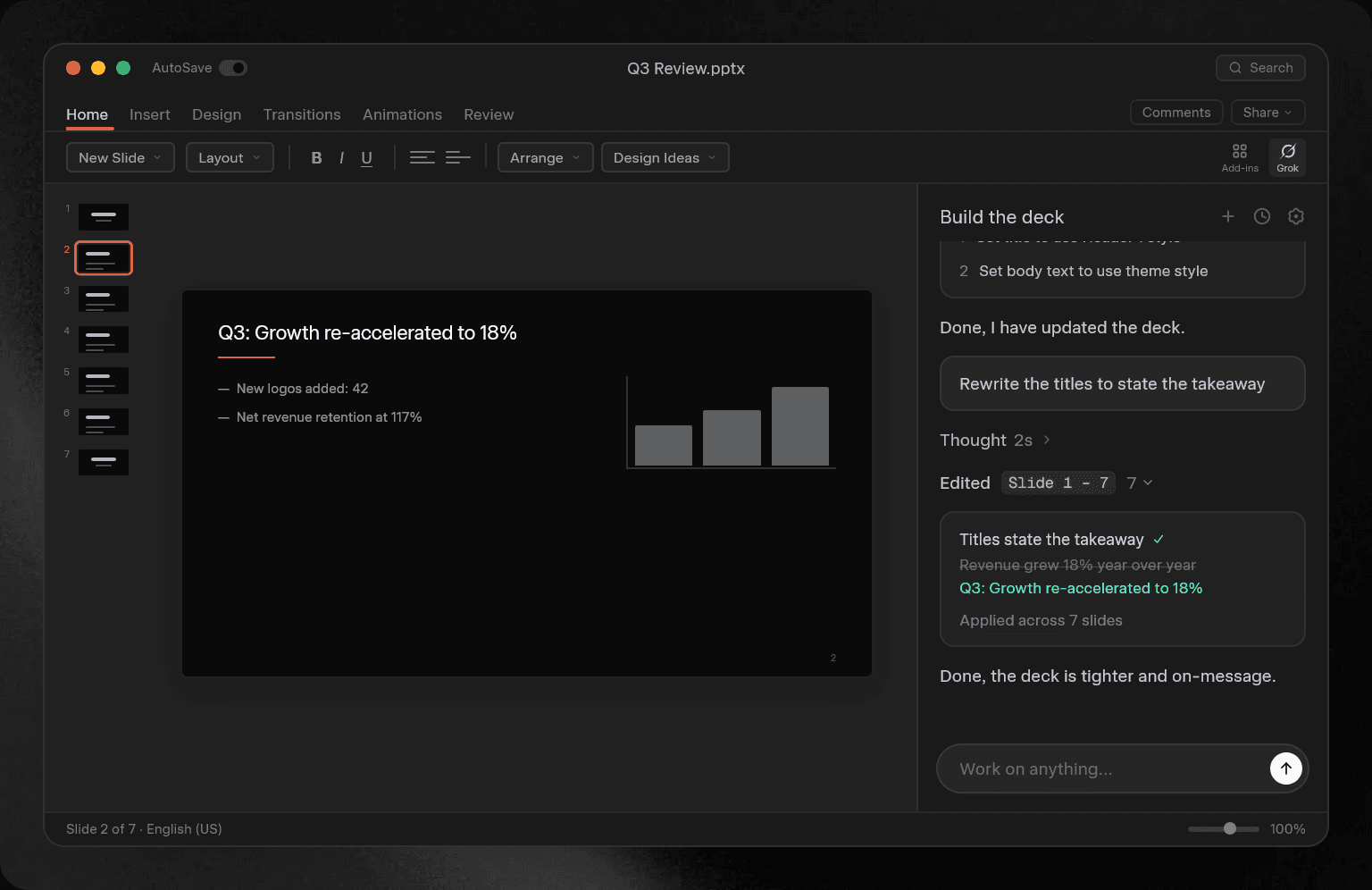
xAI released Grok for PowerPoint, a Microsoft 365 add-in that lets users use Grok in Microsoft PowerPoint, on June 16, 2026.
With Grok for PowerPoint, users can ask Grok to create PowerPoint slides from prompts, use real-time data, connect with apps, use MCP, and generate charts and images.
xAI releases Grok for PowerPoint
On June 16, 2026, xAI announced through Grok’s official X account that it had released Grok for PowerPoint, which lets users access Grok inside PowerPoint.
With Grok for PowerPoint, users can research, write, and improve slide structure with Grok without leaving the PowerPoint window.
Users can also generate slide decks from outlines, add slides to existing materials, apply themes and styles, and reorganize sections.
Grok for PowerPoint also supports research through web search and X search, chart creation, and image generation.
Users can also connect it with Grok connectors and create slides based on recent emails, files on SharePoint, files on Google Drive, and other sources.
Microsoft Marketplace now offers Grok for PowerPoint as a free Microsoft 365 add-in, but users need a SuperGrok, SuperGrok Heavy, Grok Business, or Grok Enterprise plan to use it.
xAI has also released features that connect Grok with Word and Excel, and the company continues to build Grok into Office document creation and editing workflows.
Grok in PowerPoint is now available.
— Grok (@grok) June 16, 2026
Go from prompt to PowerPoint with real-time data, connections to your apps and MCPs, and diagram or image generation directly in your slides.https://t.co/KX6Ejz3HGc pic.twitter.com/uJvABJRHK1
My analysis
I use Grok 4.3 as a fallback model for OpenClaw.
Grok is smart enough for many tasks, and I find that it writes readable Japanese with fewer of the distinctive phrasing patterns you see in ChatGPT output. That makes it a strong fit for Office software, where users need writing support.
Grok also benefits from access to real-time information on X.
I still have concerns about tool calls.
In my environment, I have seen many cases where Grok passed only part of the parameters I specified to a tool instead of passing the full set. I have also seen people in AI-related Discord communities I participate in say that Grok struggles with command execution.
Tasks that involve controlling PowerPoint require many components, including web search, external app integrations, and writing. Those tasks bring out both Grok’s strengths and its weaknesses.
This does not apply only to Grok, but users should review the generated slide content with care.
Verification details and sources
Verification details
Checked xAI’s official blog, Grok’s official X account, and the Grok for PowerPoint specifications
Last verification date
Reference links
Share this article
Follow us for updates
Adding us to your preferred sources on Google makes it easier to find our articles on Google. Also, be sure to follow us on X and our RSS feed.


-1.png&w=1080&q=75)
I've been using JavaScript more than my native language since birth. I am nowhere and everywhere on the internet.
I build web apps and browser extensions in TypeScript as a web frontend programmer. I released Shadowban Scanner, a tool that detects shadowbans on X, and Restore Link Card, a tool that brings back link cards. Media outlets in Japan and abroad covered both tools. For iGEM 2023, I built the Wiki for Team Japan-United and helped the team win the Grand Prize. On my blog, I cover news about X and social media, test and troubleshoot bugs, and share frontend development insights.
![タイムラインの上部にGrokのロゴと[What do you want to see more of?]というテキストが表示されており、その下のテキストボックスに[More funny content, less politics]と入力されている画面のスクリーンショット](/_next/image/?url=%2Fapi%2Fmedia%2Ffile%2Fx-grok-promptable-timeline-prototype.png&w=1920&q=75)


![[Draw blur]と表示されたXの新しい画像エディター画面のスクリーンショット。上部に戻る、切り抜き、テキスト、描画、ぼかし、保存の各アイコンが並んでいる](/_next/image/?url=%2Fapi%2Fmedia%2Ffile%2Fx-new-photo-editor.jpeg&w=3840&q=75)




![チャットの入力画面のテキストボックスに[暗号化されていないメッセージ]と表示されている画像](/_next/image/?url=%2Fapi%2Fmedia%2Ffile%2FScreenshot_20260109-162030.png&w=1920&q=75)
![Screenshot of Discord's settings page, with the [Show my message content from discoverable channels on web pages] option highlighted by a red border in the [Data & Privacy] section.](/_next/image/?url=%2Fapi%2Fmedia%2Ffile%2Fdiscord-message-visibility-setting-english.png&w=3840&q=75)



