
How to fix the issue where passkeys cannot be used in Firefox for Android

I encountered an issue where I could not use passkeys in Firefox for Android.
Details of the issue
In Firefox Nightly for Android, passkeys had stopped working since about 1 to 2 months ago.
On Cloudflare's dashboard login page and in GitHub's two-factor authentication, where the fingerprint authentication screen for using a passkey should have appeared, nothing was displayed.
On these sites, passkeys were already registered, and when I used Chrome instead of Firefox, I could use passkeys without any issues.
My environment was as follows.
- Browser: Firefox Nightly for Android 150.0a1
- Device: Google Pixel 8
- OS: Android 16 Beta CP11.251209.009.A1
Cause
When I investigated this issue, I found that a report that the exact same issue was occurring on the exact same OS build had been posted on Bugzilla.
According to this thread, updating to Android 17 Beta would resolve it.
In fact, after updating to Android 17 Beta CP21.260206.011, I was able to use passkeys without any problems.
Share this article
Follow us for updates
Adding us to your preferred sources on Google makes it easier to find our articles on Google. Also, be sure to follow us on X and our RSS feed.


Next articles
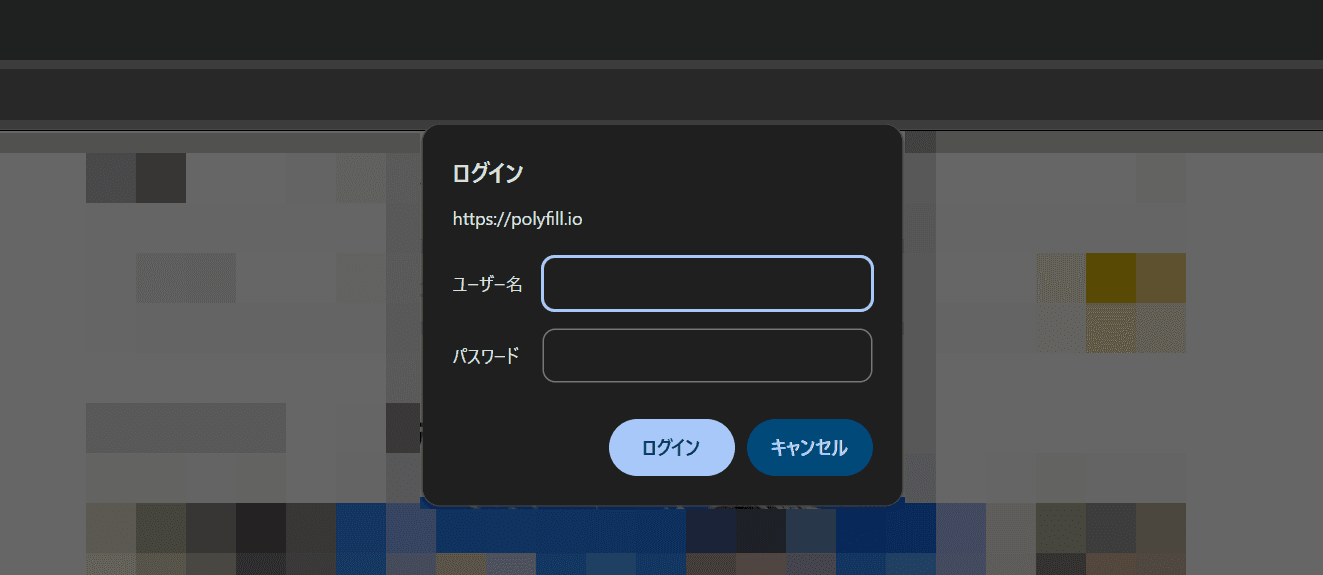
- Why some websites show “polyfill.io requires a username and password,” and what to do: do not enter any information
- How to restore Firefox’s old UI and theme after the rounded redesign
- X in-app browser user agent strings in 2026
- Use passkeys with Payload CMS through payload-passkey
- Can’t host an X Space on Android? Why the option disappeared and how to work around it
-1.png&w=1080&q=75)
I've been using JavaScript more than my native language since birth. I am nowhere and everywhere on the internet.
I build web apps and browser extensions in TypeScript as a web frontend programmer. I released Shadowban Scanner, a tool that detects shadowbans on X, and Restore Link Card, a tool that brings back link cards. Media outlets in Japan and abroad covered both tools. For iGEM 2023, I built the Wiki for Team Japan-United and helped the team win the Grand Prize. On my blog, I cover news about X and social media, test and troubleshoot bugs, and share frontend development insights.






![スマートフォンのホーム画面の[Social]フォルダーを表示した写真。フォルダー内にはFacebook、Instagram、Threads、X、LinkedIn、TikTok、YouTubeのアイコンが配置されている](/_next/image/?url=%2Fapi%2Fmedia%2Ffile%2Ffacebook-instagram-threads-x-twitter-linkedin-tiktok-youtube-mobile-app-unsplash.jpg&w=3840&q=75)


