Is X pruning your Following timeline? You can fix it just by doing this!
![スマートフォンのホーム画面の[Social]フォルダーを表示した写真。フォルダー内にはFacebook、Instagram、Threads、X、LinkedIn、TikTok、YouTubeのアイコンが配置されている](/_next/image/?url=%2Fapi%2Fmedia%2Ffile%2Ffacebook-instagram-threads-x-twitter-linkedin-tiktok-youtube-mobile-app-unsplash.jpg&w=3840&q=75)
On X (Twitter) lately, there have been a growing number of reports that in the [Following] timeline, posts from accounts you follow are being pruned, and some posts aren’t shown.
However, this issue can actually be solved in 3 seconds. In this article, we’ll clearly explain how to deal with the problem of posts being pruned in the Following timeline.
Pruning goes away just by doing this
The reason posts started being pruned in the Following timeline is that the Following timeline was split into two types: [Most recent] and [Popular].
Because the Following timeline is set to [Popular] by default, switching it to [Most recent] will make all posts show up.
Open X and select the [Following] timeline
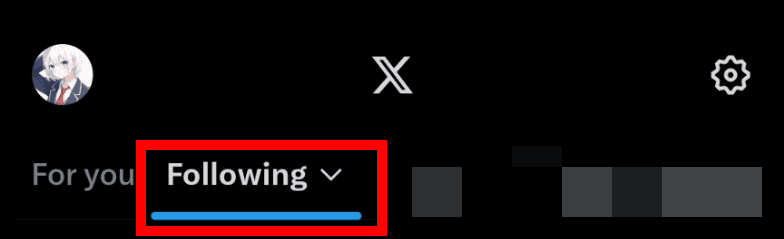
Click the text [Following]
Change [Sort following] to [Most recent]
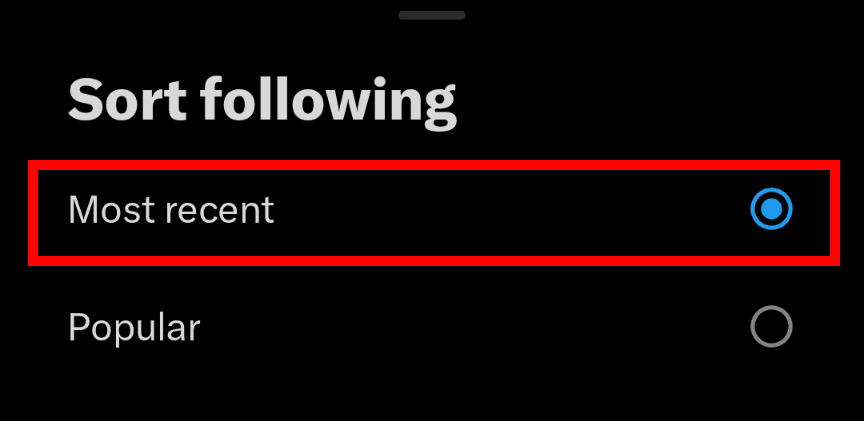
All posts will now appear in chronological order in your Following timeline
Summary
We introduced how to deal with the issue where X’s timeline is pruned and some posts don’t appear.
If it looks like posts are being pruned, it’s because X’s Following timeline was split into [Popular] and [Most recent], and [Popular] became the default.
By tapping the Following timeline and switching to [Most recent], all posts will be displayed without being pruned.
Share this article
Follow us for updates
Adding us to your preferred sources on Google makes it easier to find our articles on Google. Also, be sure to follow us on X and our RSS feed.


-1.png&w=1080&q=75)
I've been using JavaScript more than my native language since birth. I am nowhere and everywhere on the internet.
I build web apps and browser extensions in TypeScript as a web frontend programmer. I released Shadowban Scanner, a tool that detects shadowbans on X, and Restore Link Card, a tool that brings back link cards. Media outlets in Japan and abroad covered both tools. For iGEM 2023, I built the Wiki for Team Japan-United and helped the team win the Grand Prize. On my blog, I cover news about X and social media, test and troubleshoot bugs, and share frontend development insights.

![Screenshot of [Accessibility, display, and languages] > [Display] > [Font size] in the X settings](/_next/image/?url=%2Fapi%2Fmedia%2Ffile%2Fx-android-font-size-settings-english.png&w=3840&q=75)
![Screenshot of X’s settings screen showing the options under [Accessibility, display, and languages] > [Data usage]](/_next/image/?url=%2Fapi%2Fmedia%2Ffile%2Fx-data-saver-high-resolusion-image-settings-english.png&w=3840&q=75)



![YouTubeハイライトのスクリーンショットが3つ並んだ画像。左のスクリーンショットには[2025 YOUTUBE RECAP]と書かれており、中央のスクリーンショットには[Your top interests]と書かれている。右のスクリーンショットにはもっとも視聴したチャンネルとして[Rene Ritchie]が挙げられている](/_next/image/?url=%2Fapi%2Fmedia%2Ffile%2Fyoutube-recap-thumbnail.png&w=3840&q=75)