
How to set the "Made with AI" label on X posts: explained separately for before and after posting
![Xのポストの投稿画面に[Made with AI]というラベルが表示されているスクリーンショット](/_next/image/?url=%2Fapi%2Fmedia%2Ffile%2Fx-made-with-ai-label.png&w=1920&q=75)
X (Twitter) has implemented a "Made with AI" label to indicate that a post (tweet) was created using AI.
In this article, we clearly explain how to set the "Made with AI" label both before and after posting.
Table of Contents
When should you set the "Made with AI" label?
The "Made with AI" label shown under posts on X is a label indicating that content included in the post was created or edited using AI tools such as generative AI.

In recent years, with the spread of generative AI, so-called "AI slop"—low-quality mass-generated content—as well as fake images and fake videos have come to be seen as problems on X.
Also, in fields such as art, there are users who prefer content produced by humans over content generated by generative AI.
Since applying the "Made with AI" label is not mandatory, it has not been officially announced in what specific cases it should be applied.
In general, if you generate or edit text, images, videos, and so on using generative AI or AI editing features, it is a good idea to apply the "Made with AI" label.
How to set the "Made with AI" label
You can set the "Made with AI" label either before or after posting by following the steps below.
How to set it before posting
Before posting, you can set the "Made with AI" label using the following steps.
Open the post composition screen
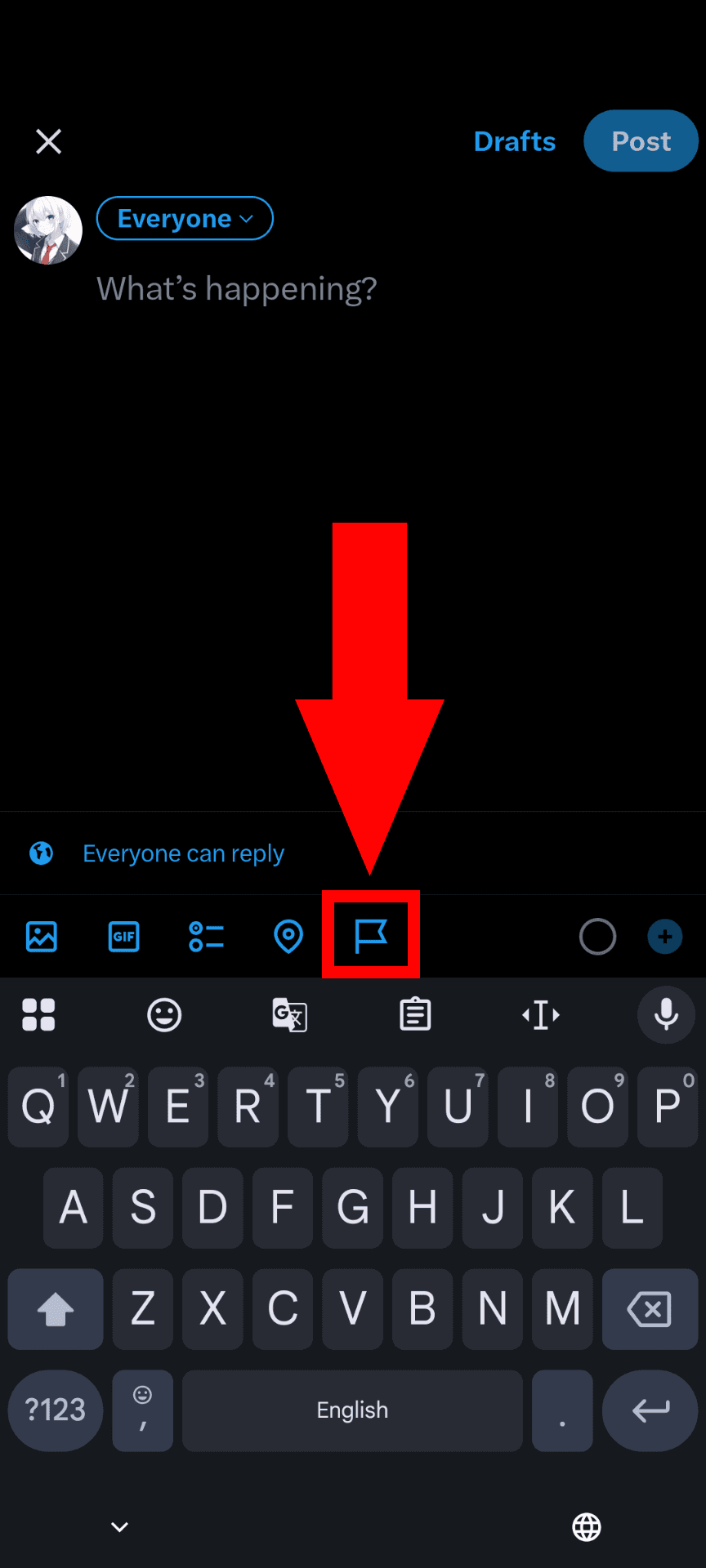
Click the flag icon shown at the bottom of the composition screen
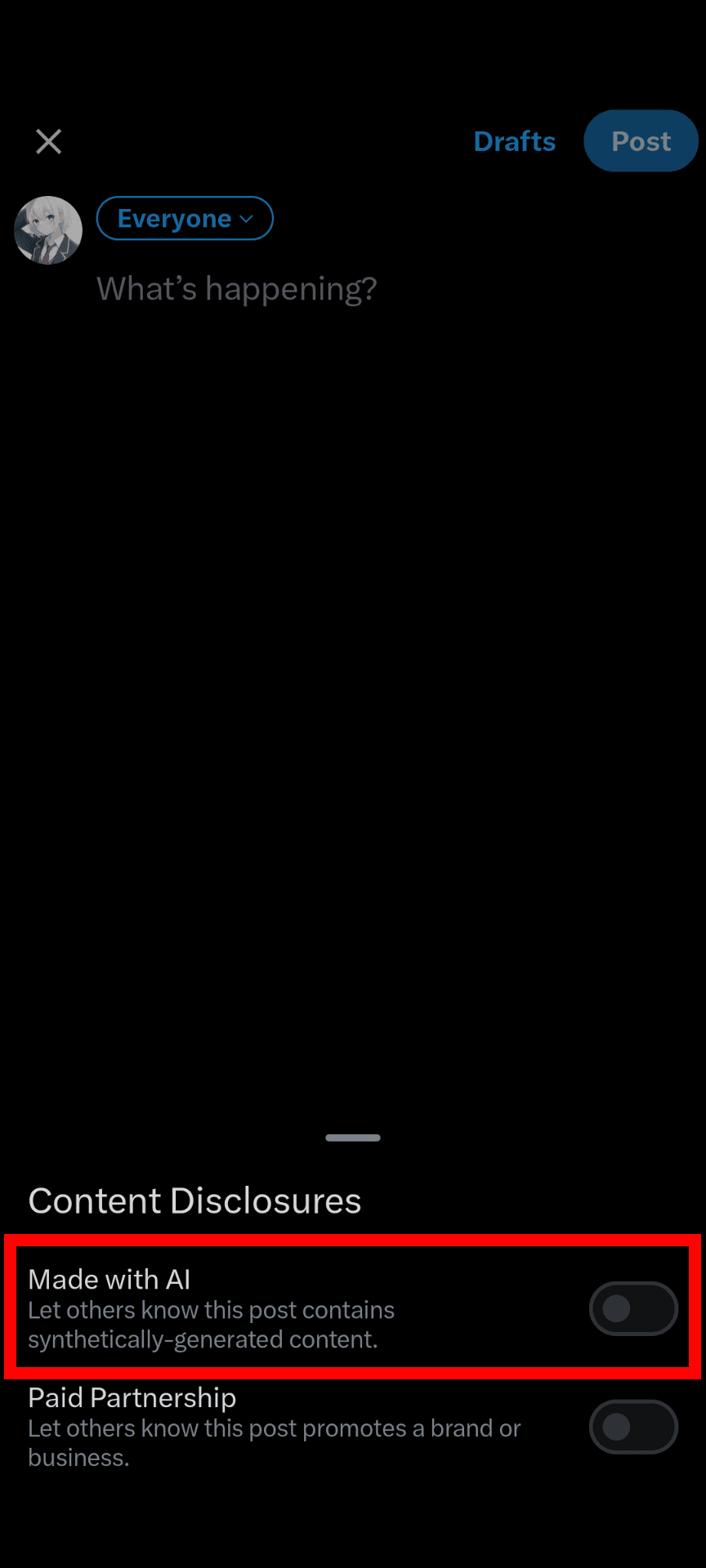
Turn on the toggle switch for "Made with AI"
Post it
How to set it after posting
After posting, you can set the "Made with AI" label using the following steps.
Open the post you want to label
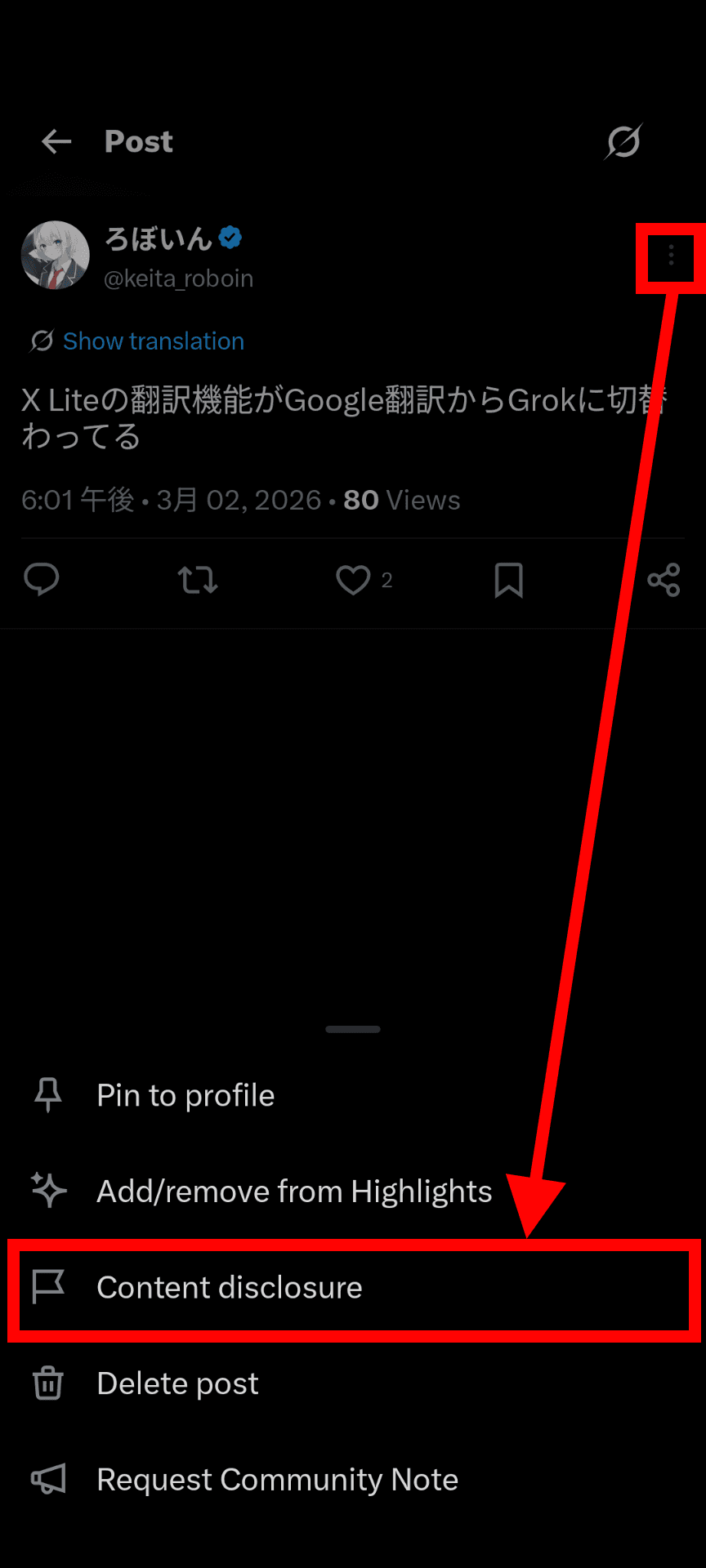
Click the menu button at the top right of the post
Select [Add/remove content disclosure] or [Content disclosure]
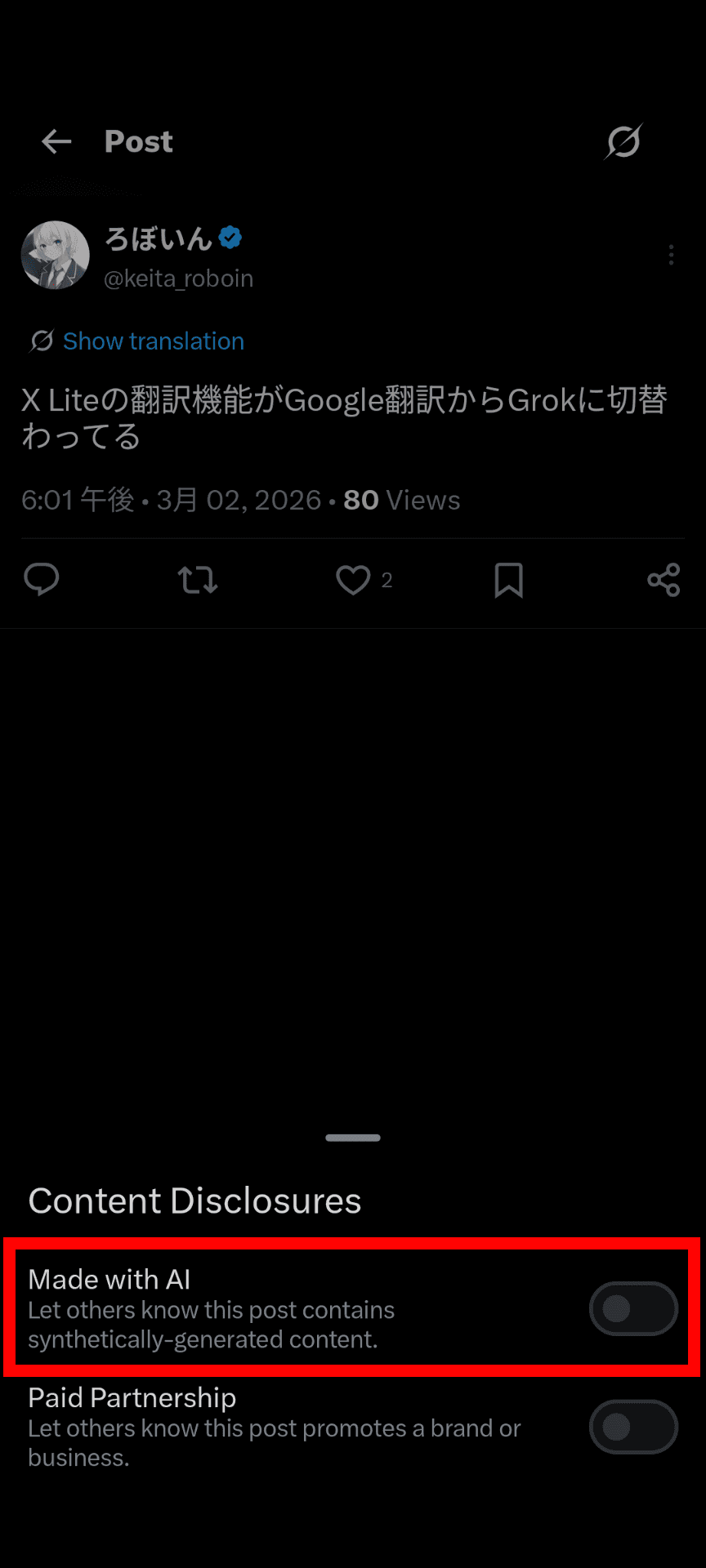
Turn on the toggle switch for "Made with AI"
What to do when you can't set the "Made with AI" label
If the flag icon does not appear on the post composition screen, or the relevant item does not appear in the menu after posting, the following causes may be possible.
The app version is outdated
Because the "Made with AI" label is a feature that was only recently added, the button may not appear if your app version is old.
Check your app version and try updating it if necessary.
The menu is cut off in the app
If there are many items in the menu shown under the post composition screen, some items may be cut off.
If you scroll the menu shown under the composition screen horizontally, the button with the flag icon may appear.
Conclusion
We explained how to set the "Made with AI" label, which indicates that a post on X was created using AI.
You can set the AI label not only when posting but also after posting.
Use this article as a reference, and try setting a label on posts you created using AI.
Verification details
Verification environment
Mobile
- OS: Android 17
- Device: Google Pixel 8
- Apps: X for Android version 11.98.0-beta.0 and X Lite for Android version 11.98.3-release.01
Desktop
- OS: Windows 11
- Browser: Zen Browser version 1.20.2b
Verification details
I confirmed that you can set the "Made with AI" label by following the steps in this article.
Last verification date
Changelog
- March 3, 2026: Published the first version
- June 10, 2026: Added the verification environment
Share this article
Follow us for updates
Adding us to your preferred sources on Google makes it easier to find our articles on Google. Also, be sure to follow us on X and our RSS feed.


-1.png&w=1080&q=75)
I've been using JavaScript more than my native language since birth. I am nowhere and everywhere on the internet.
I build web apps and browser extensions in TypeScript as a web frontend programmer. I released Shadowban Scanner, a tool that detects shadowbans on X, and Restore Link Card, a tool that brings back link cards. Media outlets in Japan and abroad covered both tools. For iGEM 2023, I built the Wiki for Team Japan-United and helped the team win the Grand Prize. On my blog, I cover news about X and social media, test and troubleshoot bugs, and share frontend development insights.


![Screenshot of [Accessibility, display, and languages] > [Display] > [Font size] in the X settings](/_next/image/?url=%2Fapi%2Fmedia%2Ffile%2Fx-android-font-size-settings-english.png&w=3840&q=75)
![Screenshot of X’s settings screen showing the options under [Accessibility, display, and languages] > [Data usage]](/_next/image/?url=%2Fapi%2Fmedia%2Ffile%2Fx-data-saver-high-resolusion-image-settings-english.png&w=3840&q=75)


![スマートフォンのホーム画面の[Social]フォルダーを表示した写真。フォルダー内にはFacebook、Instagram、Threads、X、LinkedIn、TikTok、YouTubeのアイコンが配置されている](/_next/image/?url=%2Fapi%2Fmedia%2Ffile%2Ffacebook-instagram-threads-x-twitter-linkedin-tiktok-youtube-mobile-app-unsplash.jpg&w=3840&q=75)





