Do X's two reply methods affect timeline visibility? Testing the reply icon vs. "Post your reply"
On X, you can reply to a post in two ways: by clicking the speech bubble icon or by opening the post and typing your reply into the "Post your reply" field below it.
Rumors often circulate on X that the method you use determines whether your reply appears in your followers' timelines. However, I tested both methods and found that they produce the same results.
Table of Contents
Overview
X offers two ways to reply to a post:
- Click the speech bubble icon at the bottom left of a post.
- Open a post and use the "Post your reply" text box in the post's detail view.

Users on X have repeatedly claimed that replies sent through the speech bubble icon appear in other users' timelines, while replies sent through the "Post your reply" field do not, or vice versa. I investigated this claim from a technical perspective.
How I tested the two methods
I used my web browser's developer tools to inspect the network requests sent when posting replies. Developer tools let you examine a website's structure and network traffic.
If the two methods send different data, those differences could affect whether a reply appears in other users' timelines. If both methods send the same data, however, X's servers cannot distinguish between them based on the submitted data, so we can expect X to handle the replies in the same way.
I also prepared two test accounts and examined two scenarios: replying to someone else's post and replying to my own post.
Test results
Replying to someone else's post
The following screenshots show the data sent when I replied through the speech bubble icon and through the "Post your reply" field, respectively.


The next screenshot compares the data from both requests. The red and green highlights indicate differences between them. As you can see, the data matches except for the text of the replies.
Based on these results, both methods send the same data when replying to someone else's post. Since X's servers cannot distinguish between the two methods from this data, we can expect replies to receive the same treatment in users' timelines, regardless of which method you use.
Replying to your own post
Next, I tested both methods when replying to a post from the same account.
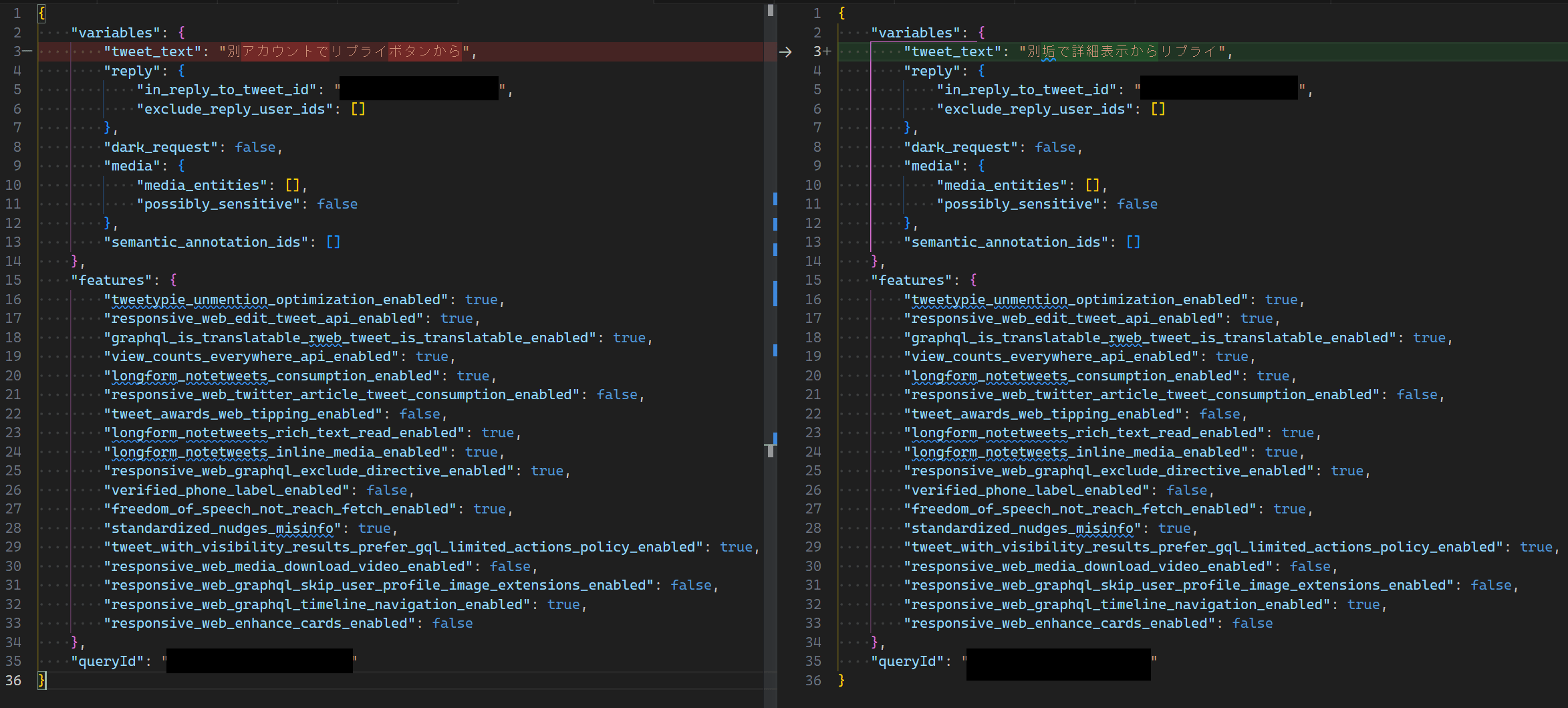
The following screenshot compares the data sent when replying through the speech bubble icon (left) and through the "Post your reply" field (right).

When replying to your own post, the submitted data differs in more than just the reply text. Requests sent through the speech bubble icon contain a batch_compose field, while requests sent through the "Post your reply" field do not.
Does this difference affect whether your replies appear in other users' timelines?
The following screenshot shows another account's timeline after I replied to my own post through the "Post your reply" field. The reply appears in the timeline.

Next, I replied through the speech bubble icon and checked the other account's timeline again. This reply also appeared in the timeline, but the previous reply sent through the "Post your reply" field was no longer visible.

I repeated the test in reverse order, replying through the speech bubble icon first and then through the "Post your reply" field. The result was the same: regardless of the method, the timeline appeared to show only the most recent reply.
Conclusion
My tests produced two findings:
- When replying to someone else's post, both methods send the same data.
- When replying to your own post, the methods send slightly different data, but the timeline displays only the most recent reply, regardless of which method you use.
Based on these results, I found no difference between replying through the speech bubble icon and replying through the "Post your reply" field, whether replying to someone else's post or your own.
The rumor that reply methods affect timeline visibility may have originated from users observing that only their most recent reply appeared in the timeline and mistakenly attributing this behavior to the method they used.
Verification details
Verification details
I posted replies under the various conditions described in the article and inspected the network requests using my browser's developer tools.
Last verification date
Changelog
- August 5, 2023, 10:36 p.m.: Initial publication
- November 5, 2026, 2:55 a.m.: Updated the article to reflect X's latest UI
Share this article
Follow us for updates
Adding us to your preferred sources on Google makes it easier to find our articles on Google. Also, be sure to follow us on X and our RSS feed.


Related articles
- X brings scheduled posts to iOS, with Android support absent
- [Android] Can you no longer hide images on X? How to reduce image data usage with the new settings
- Did the font change in the X app for Android? How to change the text size
- [Android] Why X images do not change when you tap and hold and how to fix it
- [Android] X bug deletes images and videos from published posts when you delete drafts

I've been using JavaScript more than my native language since birth. I am nowhere and everywhere on the internet.
I build web apps and browser extensions in TypeScript as a web frontend programmer. I released Shadowban Scanner, a tool that detects shadowbans on X, and Restore Link Card, a tool that brings back link cards. Media outlets in Japan and abroad covered both tools. For iGEM 2023, I built the Wiki for Team Japan-United and helped the team win the Grand Prize. On my blog, I cover news about X and social media, test and troubleshoot bugs, and share frontend development insights.