How to fix sudden login screen prompts and account hacking concerns on X for Android
![スマートフォンのホーム画面の[Social]フォルダーを表示した写真。フォルダー内にはFacebook、Instagram、Threads、X、LinkedIn、TikTok、YouTubeのアイコンが配置されている](/_next/image/?url=%2Fapi%2Fmedia%2Ffile%2Ffacebook-instagram-threads-x-twitter-linkedin-tiktok-youtube-mobile-app-unsplash.jpg&w=3840&q=75)
When you use the X app for Android, you may land on the login screen even though you already logged in.
When you see this screen, do not enter your username or password. Try using Android’s Back button or back gesture to return to the previous screen.
Table of Contents
Use the back action when X for Android takes you to the login screen
More users now report that they end up on the login screen while using the X app for Android.
You may see the following message on the login screen:
To get started, first enter your phone number, email address, or username
When you see this screen, do not enter your account information at first. Use Android’s Back button or back gesture and check whether you can return to your timeline or post screen.
In many cases involving this current bug, users seem able to recover by going back.
In recent weeks, X for Android has had issues such as a bug that prevents users from replying after they switch even once to “New X Android”, as well as a bug that removes the Media tab. This issue may also relate to the new X Android app.
![Xのプロフィールで[Videos]タブの下にドロップダウンメニューが表示されている画像](/_next/image/?url=%2Fapi%2Fmedia%2Ffile%2Fx-lite-videos-tab-dropdown-thumbnail.png&w=3840&q=75)
In my environment, I have not reproduced the bug where X takes users to the login screen without warning, either in X Lite or in the regular X app for Android.
Does this mean someone hacked your account?
When you use X for Android and end up on the login screen without warning, then return to the previous screen with the back action alone, someone most likely has not hacked your account.
However, someone may have hacked your account if you notice behavior such as the following:
- You receive a login notification you do not recognize
- You receive a notification that your email address changed
- You receive a password reset email
- Your profile or icon changes without your action
- Someone sends posts or DMs from your account without your action
- Your account follows unfamiliar accounts without your action
The first four items often appear when someone has hacked an account.
I explain what to do when you receive a login notification you do not recognize in the article below.

In particular, attackers sometimes hack accounts through tools that claim to check whether other accounts have blocked you.
![ブロックユーザー確認ツール あなたをブロックしているユーザーを特定できます。あなたは何人ものユーザーに持続的な影響力や反響を与えているのか調べてみましょう。※本ツールはX(旧Twitter)社の**公式API**を利用して情報を取得します。 [Xにログインして確認を開始]](/_next/image/?url=%2Fapi%2Fmedia%2Ffile%2Fx-block-checker-phishing-campaign.png&w=3840&q=75)
The last two behaviors may also occur after you use services such as “Twitter Family” or “My Twitter Interaction Circle.”
You need to treat these services with caution because they are spam and may involve criminal groups.
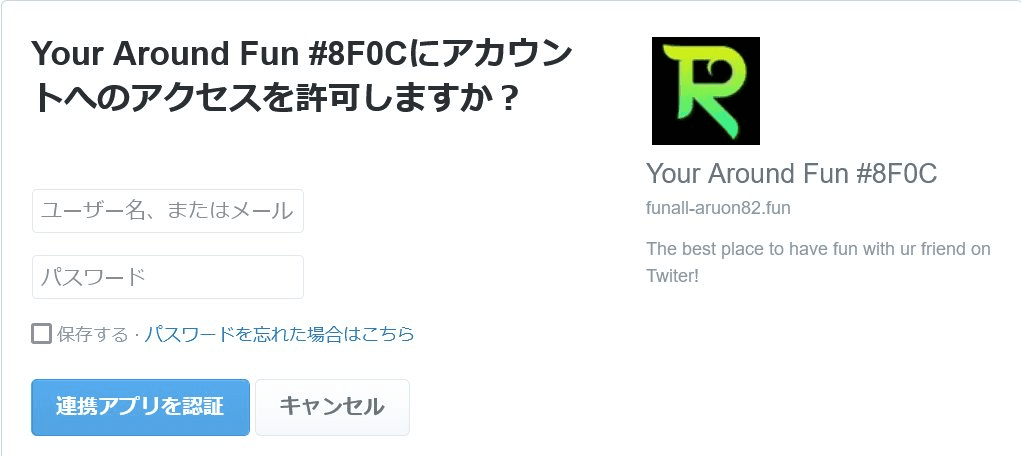
Can you enter your login information?
When you see the legitimate login screen while using the official X app you use every day, you can enter your login information. Before doing so, I recommend checking whether you can return to the previous screen with the Back button.
On the other hand, treat login screens opened from links in DMs, emails, SMS messages, or external websites with caution because they may be phishing pages.
When you open the page in a browser, check that the address belongs to x.com.
Conclusion
When the X app for Android takes you to the login screen without warning, first try going back without entering anything.
With the current bug, many users seem able to return to the timeline or another screen by using the Back button or back gesture without entering anything while the login screen remains open.
Verification details
Verification environment
- OS: Android 17
- Device: Google Pixel 8
- App: X app for Android version 11.98.0-beta.0 and X Lite for Android version 11.98.3-release.01
Verification details
I couldn’t reproduce the issue in my day-to-day setup, but many users have reported it on X.
Last verification date
Share this article
Follow us for updates
Adding us to your preferred sources on Google makes it easier to find our articles on Google. Also, be sure to follow us on X and our RSS feed.


Related articles
- [Android] Can you no longer hide images on X? How to reduce image data usage with the new settings
- Did the font change in the X app for Android? How to change the text size
- [Android] Why X images do not change when you tap and hold and how to fix it
- Why reposts and replies do not appear on X and how to find them in the new Android and iOS profiles
- X for Android bug prevents replies and saves them as drafts: How to fix it
-1.png&w=1080&q=75)
I've been using JavaScript more than my native language since birth. I am nowhere and everywhere on the internet.
I build web apps and browser extensions in TypeScript as a web frontend programmer. I released Shadowban Scanner, a tool that detects shadowbans on X, and Restore Link Card, a tool that brings back link cards. Media outlets in Japan and abroad covered both tools. For iGEM 2023, I built the Wiki for Team Japan-United and helped the team win the Grand Prize. On my blog, I cover news about X and social media, test and troubleshoot bugs, and share frontend development insights.

![Screenshot of [Accessibility, display, and languages] > [Display] > [Font size] in the X settings](/_next/image/?url=%2Fapi%2Fmedia%2Ffile%2Fx-android-font-size-settings-english.png&w=3840&q=75)
![Screenshot of X’s settings screen showing the options under [Accessibility, display, and languages] > [Data usage]](/_next/image/?url=%2Fapi%2Fmedia%2Ffile%2Fx-data-saver-high-resolusion-image-settings-english.png&w=3840&q=75)

![Xアプリの上部に[ポストを送信できません][View draft]と表示されているようす](/_next/image/?url=%2Fapi%2Fmedia%2Ffile%2Fnew-x-android-unable-to-send-post.png&w=3840&q=75)
![ChatGPTの設定画面の[パーソナライズ]タブのスクリーンショット](/_next/image/?url=%2Fapi%2Fmedia%2Ffile%2Fimage-1423.png&w=2048&q=75)